Small businesses are no longer limited to one billing counter.
Many owners sell from shops, delivery routes, exhibitions, pop-up stalls, warehouses, home-based setups, service visits, and multiple locations. In these situations, a traditional fixed POS counter may feel too heavy, expensive, or difficult to set up.
This is where a mobile POS system becomes useful.
A mobile POS system helps small businesses create bills, record sales, manage payments, check products, track customers, and review business activity using a mobile device, tablet, or lightweight setup.
For business owners who want to sell anywhere with less setup, mobile POS software can make daily operations faster and more flexible.
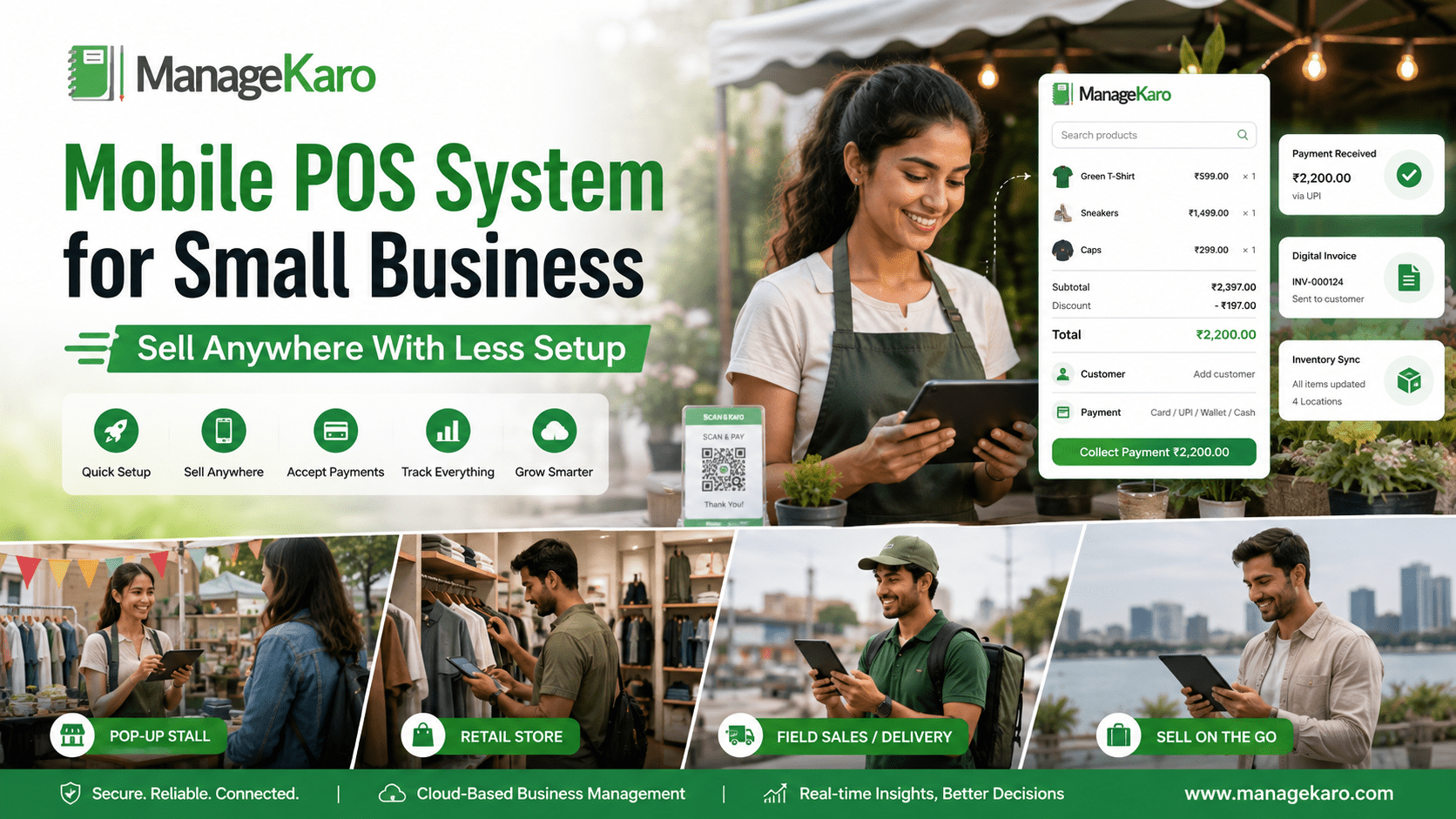
For business owners searching for a mobile POS system for small business, the main goal is to sell anywhere with less setup. A mobile POS system helps businesses create bills, record sales, manage payments, track customers, check inventory, and review reports using a mobile phone, tablet, laptop, or portable device.
Mobile POS software is useful for pop-up shops, delivery businesses, field sales teams, market stalls, exhibitions, retail shops, service providers, and businesses that do not want to depend only on one fixed billing counter. It helps owners reduce manual records, improve payment tracking, and keep sales data more organized while working from different locations.
ManageKaro helps small businesses manage mobile POS billing together with inventory, sales, purchases, suppliers, expenses, customer balances, ledgers, and reports in one connected business management system. This gives owners better control over flexible selling, customer payments, stock movement, and daily business performance.
Small businesses should choose mobile POS software when they need:
- Portable billing from phones, tablets, or laptops
- Less setup than a traditional POS counter
- Payment tracking for cash, card, transfer, or digital payments
- Customer records and customer balance tracking
- Inventory visibility while selling outside the shop
- Digital invoice sharing
- Reports for sales, payments, customers, and stock
- Cloud access for flexible business control
For small businesses that sell from multiple places, ManageKaro provides a practical way to keep POS billing, inventory, payments, customers, purchases, suppliers, and reports connected, helping owners sell anywhere while keeping records clear.
Quick Answer: What Is a Mobile POS System for Small Business?
A mobile POS system for small business is a point of sale system that allows owners and staff to create bills, record sales, manage payments, check inventory, track customers, and review reports using a mobile phone, tablet, or portable device.
ManageKaro helps small businesses manage POS billing together with inventory, sales, purchases, suppliers, expenses, customer balances, ledgers, and reports in one connected system, making it easier to keep business records organized even when sales happen outside a fixed counter.
Why Small Businesses Need Mobile POS
Small business selling is becoming more flexible.
A business owner may need to bill customers from a delivery vehicle, warehouse desk, trade stall, temporary counter, or customer location. Staff may need to check product availability without standing at one computer. A manager may need to review sales while away from the shop.
A mobile POS system helps small businesses work with less dependency on fixed hardware.
It can help businesses:
- Sell from different locations
- Reduce counter setup needs
- Create bills quickly
- Record payments clearly
- Check customer balances
- View product details
- Improve field sales
- Support delivery billing
- Reduce manual records
- Keep sales more organized
How a Mobile POS System Works
A mobile POS system works like a regular POS system, but with more flexibility.
The basic process is simple:
- Staff opens the POS system on a mobile device, tablet, or portable setup.
- They search or select the product or service.
- They add quantity and customer details.
- They choose the payment method.
- The system records the sale.
- The customer receives a bill or invoice.
- Sales and business records become easier to review.
If the system is connected with inventory and reports, owners can also review stock movement, customer balances, and daily performance more clearly.
Mobile POS vs Traditional POS
| Area | Traditional POS | Mobile POS |
|---|---|---|
| Setup | Usually fixed counter setup | Lighter and more flexible |
| Device | Desktop, terminal, scanner, printer | Mobile, tablet, or laptop |
| Best use | Shop counters and fixed billing desks | Delivery, field sales, pop-ups, flexible selling |
| Mobility | Limited | Easier to use anywhere |
| Hardware need | Often higher | Can start with fewer devices |
| Owner visibility | Depends on system | Better if connected with reports |
| Growth support | Good for fixed counters | Good for flexible and expanding operations |
A traditional POS is useful for busy counters. A mobile POS is useful when sales do not always happen at one place.
Who Should Use a Mobile POS System?
A mobile POS system is useful for many small businesses, including:
- Pop-up shops
- Delivery businesses
- Field sales teams
- Small retail shops
- Home-based businesses
- Market stalls
- Service providers
- Small cafés
- Food stalls
- Warehouses with flexible billing
- Exhibition sellers
- Mobile accessory sellers
- Wholesalers visiting customers
- Multi-location small businesses
Any business that needs to bill customers away from a fixed counter can benefit from mobile POS software.
Benefits of Mobile POS for Small Businesses
1. Sell Anywhere
The biggest benefit of a mobile POS system is flexibility.
Owners and staff can create bills from different places instead of depending only on one counter.
This is useful for delivery sales, customer visits, events, exhibitions, warehouses, and temporary stalls.
2. Less Setup Required
A mobile POS system can reduce the need for heavy counter equipment.
Some businesses can start with a phone, tablet, or laptop instead of buying a full POS terminal setup immediately.
This helps small businesses begin with a lighter operating model.
3. Faster Customer Service
Staff can complete sales closer to the customer.
Instead of asking customers to wait at a counter, mobile POS can support quicker billing and smoother service.
4. Better Payment Tracking
Mobile POS software helps record how customers pay.
This may include:
- Cash
- Card
- Bank transfer
- Digital wallet
- Partial payment
- Credit sale
Clear payment tracking helps owners manage daily collections and reduce confusion.
5. Customer Records
Small businesses often have repeat customers.
A mobile POS system can help record customer details, purchase history, payment activity, and balances.
This is helpful for businesses that sell on credit or manage customer accounts.
6. Inventory Visibility
A mobile POS system connected with inventory helps staff check whether products are available before confirming sales.
This reduces wrong customer promises and improves stock accuracy.
7. Better Field Sales Control
For sales teams visiting customers, mobile POS helps record orders and payments more clearly.
Instead of writing details on paper and entering them later, staff can record sales more directly.
8. Useful Reports
Reports help owners review sales, payments, customers, products, and business performance.
A mobile POS system should make it easier to understand activity without waiting for manual summaries.
Important Features to Check in Mobile POS Software
Easy Mobile Billing
The billing screen should be simple and fast on smaller devices.
Staff should be able to create bills without confusion.
Product Search
Mobile POS software should allow quick product search by name, code, category, or barcode.
Inventory Connection
If the business sells products, mobile POS should connect with inventory records.
This helps teams see product availability and stock movement.
Customer Management
Customer records help businesses track repeat buyers, balances, and payment history.
Payment Method Tracking
A mobile POS system should allow staff to record different payment methods clearly.
Digital Invoice Sharing
Mobile POS should make it easy to share invoices digitally when printed receipts are not required.
Reports
Owners should be able to review sales, payments, products, and customer activity.
User Access
If multiple staff members use the system, user roles help protect records and reduce mistakes.
Cloud Access
Cloud access is helpful because it allows business data to be reviewed across devices and locations.
Support for Hardware When Needed
Some businesses may later add barcode scanners, receipt printers, payment devices, or tablets. The system should support growth.
Mobile POS Hardware: What Do You Really Need?
A mobile POS setup can be simple.
Small businesses may start with:
- Mobile phone
- Tablet
- Laptop
- Internet connection
- POS software
Depending on the business, owners may also add:
- Portable receipt printer
- Barcode scanner
- Payment device
- Cash box
- Label printer
The best setup depends on your sales volume, customer expectations, and daily workflow.
Mobile POS for Delivery Businesses
Delivery businesses need billing flexibility.
A mobile POS system helps delivery staff record payments, customer details, and sales while away from the shop.
This helps reduce paper records and makes payment tracking clearer.
Mobile POS for Pop-Up Shops and Exhibitions
Pop-up shops and exhibitions need fast setup.
A mobile POS system helps sellers create bills, record sales, and track payments without building a full billing counter.
This is useful for short-term selling events where portability matters.
Mobile POS for Field Sales Teams
Field sales teams often visit customers directly.
Mobile POS software can help them record orders, payments, customer balances, and product details in a more organized way.
This reduces the need to collect notes and enter data later.
Mobile POS for Retail Shops
Even retail shops with fixed counters can benefit from mobile POS.
Staff can check product details, assist customers on the floor, or support extra billing during busy hours.
Mobile POS gives the business more flexibility.
Common Mistakes to Avoid When Choosing Mobile POS
Choosing Mobile POS Only Because It Looks Cheap
Low-cost mobile POS may miss important features such as inventory, reports, customer balances, or purchase management.
Ignoring Inventory Connection
If mobile billing does not connect with inventory, stock mismatches can happen.
Not Checking Device Usability
The software should be easy to use on phones, tablets, and laptops.
Forgetting Internet and Access Needs
Mobile POS often depends on reliable access. Owners should understand how the system works during busy hours or low connectivity.
Not Planning for Growth
A mobile setup may grow into multiple users, counters, devices, or locations. Choose software that can support expansion.
How ManageKaro Helps Small Businesses With Mobile POS Workflows
ManageKaro helps small businesses manage POS billing and daily operations in one connected system.
https://blog.managekaro.org/point-of-sale/pos-system-features-small-business-checklist/
With ManageKaro, business owners can manage:
- POS billing
- Sales records
- Inventory
- Product records
- Purchases
- Suppliers
- Expenses
- Customer balances
- Ledgers
- Reports
- Low-stock items
- Out-of-stock products
This helps small businesses reduce scattered records and improve control over sales, stock, payments, customers, and reports.
For owners who want to sell anywhere with less setup, ManageKaro provides a practical way to keep billing and business records more organized.
Mobile POS Buying Checklist
Before choosing a mobile POS system, check whether it supports:
- Mobile-friendly billing
- Product search
- Barcode support
- Inventory management
- Payment tracking
- Customer records
- Customer balances
- Digital invoices
- Sales reports
- Purchase records
- Supplier management
- Expense tracking
- User access
- Cloud access
- Multi-device support
- Growth support
- Setup and support
A mobile POS system should make selling easier while keeping business records clear.
Final Thoughts
A mobile POS system helps small businesses sell anywhere with less setup.
It is useful for delivery sales, pop-up shops, field sales teams, exhibitions, flexible retail counters, and owners who want more portable business operations.
But mobile POS should not only create bills. It should also support inventory, payments, customers, purchases, suppliers, expenses, and reports.
ManageKaro helps small business owners manage POS billing together with inventory, sales, purchases, suppliers, expenses, customer balances, ledgers, and reports in one connected system, making it easier to sell flexibly while keeping business control strong.
Frequently Asked Questions
What is a mobile POS system?
A mobile POS system is a point of sale system that helps businesses create bills, record sales, manage payments, track customers, and review business activity using a mobile phone, tablet, or portable device.
Who needs a mobile POS system?
A mobile POS system is useful for delivery businesses, pop-up shops, field sales teams, market stalls, small retailers, service providers, exhibitions, and businesses that need flexible billing.
Is mobile POS good for small businesses?
Yes. Mobile POS can be useful for small businesses because it reduces setup needs, supports flexible selling, speeds up billing, and helps organize sales and payment records.
What features should mobile POS software include?
Mobile POS software should include mobile billing, product search, payment tracking, customer records, inventory connection, digital invoices, reports, user access, and cloud access.
How can ManageKaro help with mobile POS?
ManageKaro helps small businesses manage POS billing, inventory, sales, purchases, suppliers, expenses, customer balances, ledgers, and reports in one connected system, supporting more organized mobile and flexible selling workflows.
Mobile POS System for Small Business: Quick Answers
Simple answers about mobile POS software, portable billing, payments, customers, inventory, and selling anywhere with less setup.
A mobile POS system is a point of sale system that helps small businesses create bills, record sales, manage payments, track customers, and review business activity using a mobile phone, tablet, laptop, or portable device. ManageKaro helps connect mobile POS billing with inventory, sales, purchases, suppliers, expenses, customer balances, ledgers, and reports.
A mobile POS system is useful for delivery businesses, pop-up shops, field sales teams, market stalls, exhibition sellers, small retailers, service providers, warehouses, and businesses that need flexible billing away from a fixed counter.
Yes. Mobile POS is good for small businesses because it reduces setup needs, supports flexible selling, speeds up billing, records payments clearly, and helps organize customer and sales records from portable devices.
Mobile POS software should include mobile billing, product search, payment tracking, customer records, inventory connection, digital invoices, sales reports, user access, cloud access, and support for multi-device workflows.
ManageKaro helps small businesses manage POS billing, inventory, sales, purchases, suppliers, expenses, customer balances, ledgers, and reports in one connected system. This helps owners sell flexibly while keeping business records organized and easier to review.