
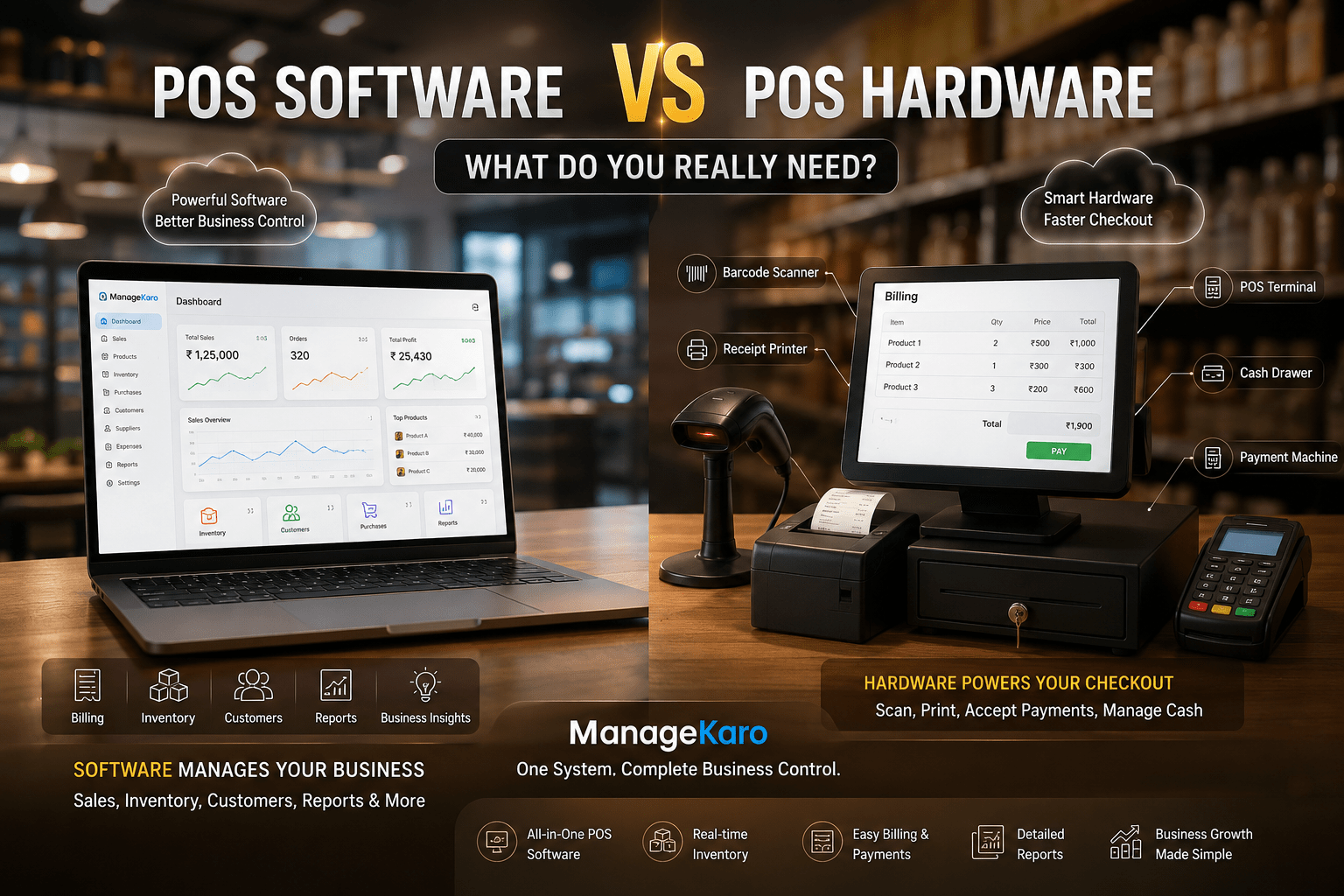
When business owners think about a point of sale system, they often imagine a billing counter with a screen, barcode scanner, receipt printer, cash drawer, and payment machine.
But a POS system is not just hardware.
The most important part is usually the POS software—the system that creates bills, records sales, manages products, updates inventory, tracks customers, and shows reports.
POS hardware supports the billing process, but POS software controls the business data.
So, what do you really need?
The answer depends on your business size, sales volume, products, staff, and daily workflow. Some businesses need a full counter setup with scanners and printers. Others may only need POS software on a laptop, tablet, or mobile device.
This guide explains the difference between POS software and POS hardware so business owners can choose the right setup without overspending.
Quick Answer: POS Software vs POS Hardware
POS software is the digital system that manages billing, sales, inventory, customers, payments, and reports. POS hardware includes the physical devices used during checkout, such as barcode scanners, receipt printers, cash drawers, POS terminals, and payment machines.
For most growing businesses, POS software is the foundation. Hardware should be added based on actual business needs.
ManageKaro helps business owners manage POS billing together with inventory, sales, purchases, suppliers, expenses, customer balances, ledgers, and reports in one connected system.
What Is POS Software?
POS software is the main system used to manage sales and business records.
It helps businesses:
- Create bills
- Record sales
- Manage products
- Track inventory
- Handle customer balances
- Record payments
- Manage discounts
- Review reports
- Track purchases
- Manage suppliers
- Monitor daily business activity
In simple words, POS software is the brain of the point of sale system.
Without good software, hardware alone cannot help you understand your business.
What Is POS Hardware?
POS hardware means the physical devices used to complete sales at the counter.
Common POS hardware includes:
- Computer or laptop
- POS terminal
- Tablet or mobile device
- Barcode scanner
- Receipt printer
- Cash drawer
- Payment machine
- Customer display screen
- Label printer
- Keyboard and mouse
Hardware makes checkout faster and more professional, but it does not manage business data on its own.
For example, a barcode scanner can scan a product, but the POS software must identify the product, price, quantity, stock level, and bill total.
POS Software vs POS Hardware: Main Difference
| Area | POS Software | POS Hardware |
|---|---|---|
| Meaning | Digital system for billing and business records | Physical devices used at checkout |
| Main role | Manages sales, inventory, customers, and reports | Supports scanning, printing, payments, and cash handling |
| Example | ManageKaro POS billing and inventory system | Barcode scanner, printer, cash drawer |
| Needed for data | Yes | No, hardware depends on software |
| Needed for speed | Yes | Yes, for busy counters |
| Best use | Business control and reporting | Faster and easier checkout |
POS software helps you manage the business. POS hardware helps you complete transactions more smoothly.
Which One Is More Important?
For most businesses, POS software is more important than POS hardware.
Why?
Because software keeps the records.
A business can create bills using POS software on a laptop without a barcode scanner or receipt printer. But if a business only has hardware without software, it cannot properly track sales, inventory, customers, purchases, and reports.
Hardware improves checkout speed. Software improves business control.
The best approach is to choose strong POS software first, then add hardware based on your daily workflow.
When Do You Need POS Software?
You need POS software if you want to:
- Create bills quickly
- Record daily sales
- Track products
- Manage inventory
- Reduce billing mistakes
- See low-stock items
- Manage customer balances
- Track expenses
- Review reports
- Understand product performance
- Manage purchases and suppliers
- Improve business control
Any business that sells regularly should use POS software.
When Do You Need POS Hardware?
You need POS hardware when your checkout process becomes busy, repetitive, or customer-facing.
For example, you may need a barcode scanner if you sell many products daily. You may need a receipt printer if customers require printed invoices. You may need a cash drawer if staff handle cash at the counter.
Hardware is useful when it saves time, improves accuracy, or makes checkout more professional.
Common POS Hardware and What It Does
1. Barcode Scanner
A barcode scanner helps staff add products to the bill quickly.
It is useful for:
- Grocery stores
- Pharmacies
- Retail shops
- Supermarkets
- Electronics stores
- Garment shops
- Hardware stores
If your business has many products, barcode scanning can reduce product selection mistakes.
2. Receipt Printer
A receipt printer prints bills or invoices for customers.
It is useful when customers expect printed proof of purchase or when your business needs physical receipts for records.
3. Cash Drawer
A cash drawer stores cash safely at the billing counter.
It is useful for businesses that handle regular cash payments.
4. Payment Machine
A payment machine helps accept card or digital payments.
Businesses that serve walk-in customers may need payment hardware for customer convenience.
5. POS Terminal
A POS terminal is a dedicated device used for billing.
It is common in shops, restaurants, supermarkets, and high-volume counters.
6. Tablet or Mobile Device
A tablet or mobile device can be used for portable billing.
This is useful for delivery businesses, small shops, restaurants, pop-up stalls, and field sales teams.
7. Label Printer
A label printer helps print product labels or barcodes.
It is useful for businesses that package, price, or label products regularly.
What Small Businesses Really Need
Not every small business needs a full hardware setup from day one.
A small business can often start with:
- POS software
- Laptop or desktop
- Basic printer if needed
- Barcode scanner if product volume is high
As the business grows, it can add:
- Receipt printer
- Cash drawer
- Payment terminal
- Label printer
- Extra billing counters
- More user accounts
- Multi-location support
The smart approach is to avoid unnecessary hardware and invest first in software that improves daily control.
What Retail Shops Need
A retail shop usually needs:
- POS software
- Product management
- Inventory tracking
- Barcode scanner
- Receipt printer
- Cash drawer
- Sales reports
- Low-stock visibility
Retail shops benefit from hardware because billing is frequent and product selection must be fast.
What Restaurants and Cafés Need
Restaurants and cafés may need:
- POS software
- Order billing
- Receipt printer
- Payment device
- Counter or tablet setup
- Customer records
- Daily sales reports
Some restaurants may need kitchen order printers or table management, depending on their workflow.
What Wholesalers Need
Wholesalers may need less counter hardware but stronger software.
They often need:
- POS billing
- Bulk sales records
- Customer balances
- Credit tracking
- Purchase records
- Supplier records
- Ledgers
- Inventory reports
For wholesalers, software is often more important than hardware because customer balances, product quantities, and reports matter more than fast counter scanning.
What Multi-Location Businesses Need
Multi-location businesses need software that can support visibility across branches, warehouses, and teams.
They may need:
- Cloud-based POS software
- Location-wise inventory
- Multi-user access
- Reports by branch
- Stock transfer visibility
- Billing records across locations
- Hardware at each counter if needed
Hardware can be added at each location, but centralized software is what gives owners control.
Mistakes to Avoid When Buying POS Hardware
Buying Hardware Before Choosing Software
Not all hardware works with all software. Choose the POS software first, then check compatible hardware.
Buying Too Much Hardware Too Early
A small shop may not need every device on day one.
Start with what supports your real workflow.
Ignoring Staff Usability
Hardware should make billing easier, not more complicated.
Forgetting Maintenance
Printers, scanners, and terminals may need maintenance, paper rolls, labels, repairs, or replacement.
Choosing Hardware Without Growth Planning
If your business may add more counters or branches, plan your setup carefully.
Mistakes to Avoid When Choosing POS Software
Choosing Software Only for Billing
POS software should help with more than invoices. It should support inventory, sales, purchases, customers, expenses, and reports.
Ignoring Inventory Connection
If billing and stock are separate, stock records can become inaccurate.
Choosing Complicated Software
If staff cannot learn it easily, daily adoption becomes difficult.
Not Checking Reports
Reports help owners make better decisions. Choose software that makes reports easy to review.
Not Thinking About Future Growth
Choose software that can support more products, users, customers, and locations as your business grows.
How ManageKaro Helps With POS Software
ManageKaro helps business owners manage POS billing and daily operations in one connected system.
With ManageKaro, businesses can manage:
- POS billing
- Sales records
- Product records
- Inventory
- Purchases
- Suppliers
- Expenses
- Customer balances
- Ledgers
- Reports
- Low-stock visibility
- Out-of-stock tracking
This means ManageKaro acts as the software foundation for business control.
Business owners can then choose POS hardware such as barcode scanners, printers, cash drawers, and payment devices based on what their business actually needs.
Simple Buying Guide: What Should You Choose First?
Step 1: Choose POS Software First
Start with software that manages billing, inventory, customers, purchases, suppliers, and reports.
Step 2: Check Your Billing Volume
If you have many daily transactions, hardware like scanners and printers may help.
Step 3: Check Your Product Count
If you manage many products, barcode scanning and label printing may be useful.
Step 4: Check Your Customer Expectations
If customers expect printed receipts, add a receipt printer.
Step 5: Check Payment Methods
If customers prefer card or digital payments, add a payment terminal.
Step 6: Check Growth Needs
If you plan to add branches, counters, or staff, choose scalable software before buying hardware.
Final Thoughts
POS software and POS hardware work together, but they are not the same.
POS software manages the business data. POS hardware supports the checkout process.
For most businesses, POS software should come first because it helps manage billing, sales, inventory, customers, purchases, suppliers, expenses, ledgers, and reports.
Hardware should be added when it improves speed, accuracy, customer experience, or staff workflow.
ManageKaro helps business owners manage POS billing and business operations in one connected system, making it easier to build the right POS setup without depending on scattered manual records.
Frequently Asked Questions
What is the difference between POS software and POS hardware?
POS software is the digital system that manages billing, sales, inventory, customers, payments, and reports. POS hardware includes physical devices such as barcode scanners, receipt printers, cash drawers, and payment machines.
Do I need POS hardware to use POS software?
Not always. Many businesses can use POS software on a laptop, desktop, tablet, or mobile device. Hardware is added when you need faster scanning, printed receipts, payment devices, or cash handling.
What POS hardware does a small business need?
A small business may need a laptop or computer, receipt printer, barcode scanner, cash drawer, and payment device, depending on sales volume and customer needs.
Which is more important: POS software or POS hardware?
POS software is usually more important because it manages business records, billing, inventory, customers, purchases, and reports. Hardware supports the checkout process but does not manage data alone.
How can ManageKaro help with POS software?
ManageKaro helps businesses manage POS billing, inventory, sales, purchases, suppliers, expenses, customer balances, ledgers, and reports in one connected system.
One thought on “POS Software vs POS Hardware: What Do You Really Need?”