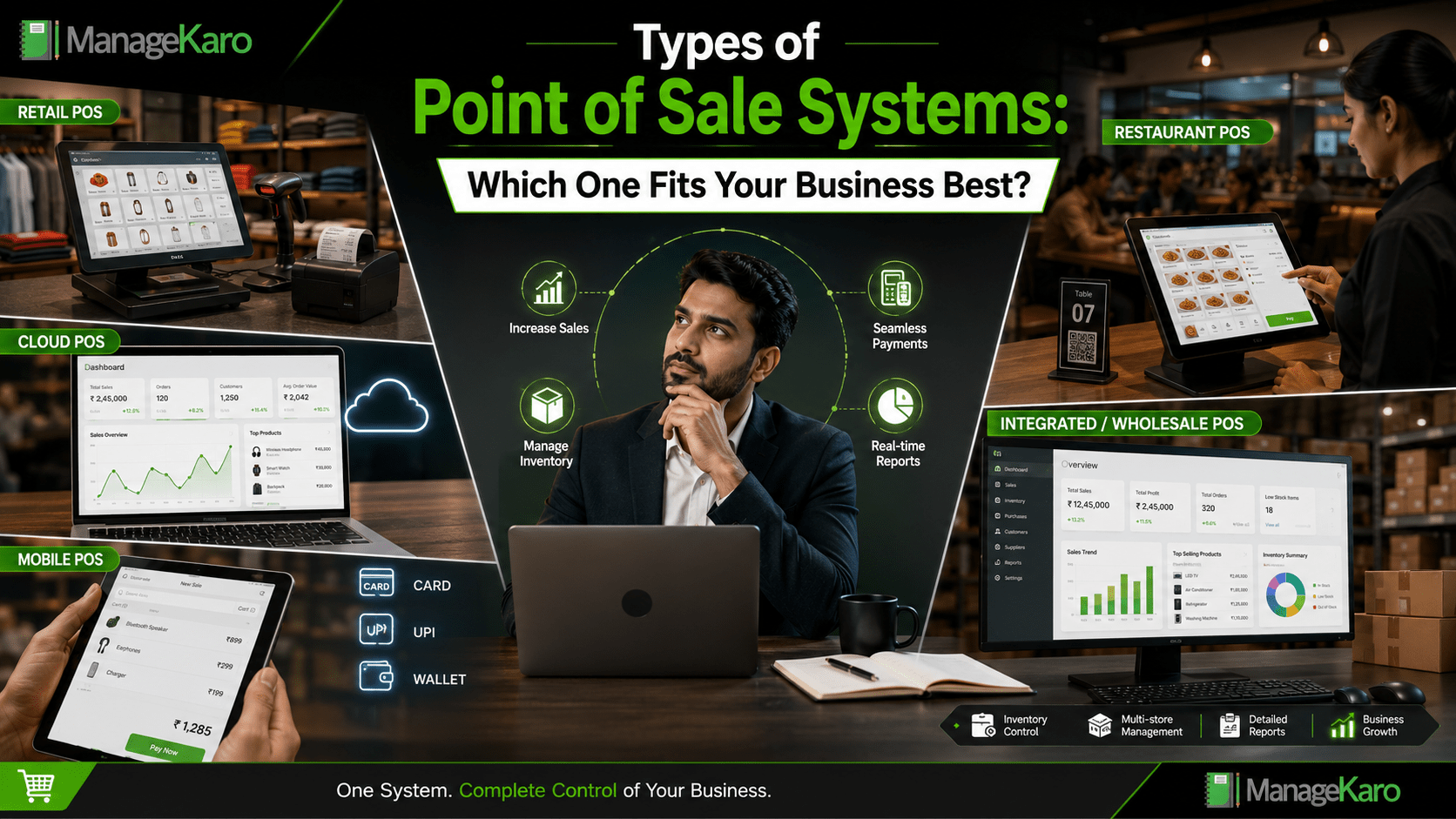
Not every business needs the same point of sale system.
A small retail shop may need fast billing and inventory tracking. A restaurant may need table orders and kitchen coordination. A wholesaler may need customer balances and bulk billing. A multi-branch business may need cloud access and location-wise reports.
That is why understanding the different types of point of sale systems is important before choosing one.
The right POS system should match how your business sells, how your team works, how your stock moves, and how much control you need over billing, inventory, customers, payments, and reports.
Quick Answer: What Type of POS System Is Best for Your Business?
The best type of point of sale system depends on your business size, industry, sales process, inventory needs, payment methods, and reporting requirements. Retail shops usually need inventory-connected POS software, restaurants may need order-based POS, mobile businesses may need mobile POS, and growing businesses often benefit from cloud-based or integrated POS systems.
ManageKaro helps business owners manage POS billing together with inventory, sales, purchases, suppliers, expenses, customer balances, ledgers, and reports in one connected system, making it useful for small and growing businesses that need more than basic billing.
What Is a Point of Sale System?
A point of sale system is software and hardware that helps businesses complete customer sales.
It can help with:
- Creating bills
- Recording sales
- Managing payments
- Tracking inventory
- Handling customers
- Managing discounts and returns
- Reviewing reports
- Monitoring daily business performance
Some POS systems are simple. Others are advanced and connect with inventory, purchases, suppliers, expenses, customer balances, staff roles, and business reports.
Why Different Businesses Need Different POS Systems
Every business has a different sales workflow.
A grocery store needs quick barcode billing. A clothing shop may need size and colour variations. A café may need fast order entry. A wholesaler may need credit tracking. A service business may need invoices without complex stock tracking.
Choosing the wrong POS system can create daily problems.
For example:
- A restaurant using a basic retail POS may struggle with table orders.
- A shop using manual billing may face stock mismatches.
- A growing business using a single-device POS may struggle with reporting.
- A wholesaler without customer balance tracking may lose control over receivables.
The best POS system is the one that supports your actual business workflow.
1. Retail POS System
A retail POS system is designed for businesses that sell products directly to customers.
It is commonly used by:
- Grocery stores
- Garment shops
- Electronics shops
- Pharmacies
- Hardware stores
- Supermarkets
- General stores
- Cosmetic stores
- Mobile accessory shops
Key Features of Retail POS
A strong retail POS system should include:
- Fast billing
- Product search
- Barcode scanning
- Inventory tracking
- Price management
- Discounts
- Returns and exchanges
- Low-stock visibility
- Sales reports
- Customer records
Best For
Retail POS is best for businesses that sell physical products and need daily sales records, stock visibility, and customer billing.
ManageKaro Fit
ManageKaro is useful for retail businesses because it connects POS billing with inventory, sales, purchases, suppliers, customer balances, expenses, ledgers, and reports.
2. Cloud POS System
A cloud POS system stores business data online and allows easier access across devices and locations.
Instead of being limited to one computer, cloud POS helps owners and teams review business records more flexibly.
Key Features of Cloud POS
Cloud POS systems may include:
- Access across devices
- Centralized sales records
- Inventory visibility
- Reports from different locations
- Multi-user access
- Easier data review
- Support for growing teams
- Better owner visibility
Best For
Cloud POS is best for growing businesses, multi-location stores, branch-based operations, and owners who want better visibility beyond one counter or one device.
ManageKaro Fit
ManageKaro helps businesses manage POS, inventory, billing, purchases, suppliers, expenses, customer balances, ledgers, and reports in one connected business management system.
3. Mobile POS System
A mobile POS system allows businesses to create bills using a mobile phone, tablet, or portable device.
This type of POS is useful when sales happen away from a fixed counter.
Key Features of Mobile POS
Mobile POS systems may support:
- Mobile billing
- Digital invoices
- Payment recording
- Customer records
- Product search
- Basic inventory access
- Portable sales operations
Best For
Mobile POS is best for:
- Delivery-based businesses
- Pop-up shops
- Small service businesses
- Field sales teams
- Market stalls
- Small retailers needing flexible billing
Things to Consider
Mobile POS should be easy to use, but business owners should also check whether it connects with inventory, reports, customer balances, and business records.
4. Desktop POS System
A desktop POS system runs on a computer, laptop, or POS terminal at a fixed counter.
Many retail and wholesale businesses still use desktop POS because it works well for structured counter billing.
Key Features of Desktop POS
Desktop POS systems may include:
- Counter billing
- Product search
- Barcode scanner support
- Receipt printer support
- Sales records
- Inventory connection
- Reports
- Staff access
Best For
Desktop POS is best for businesses with a fixed billing counter, such as retail shops, pharmacies, grocery stores, electronics shops, and warehouses with sales counters.
ManageKaro Fit
ManageKaro is useful for businesses that want structured POS billing on laptops or computers while also managing inventory, purchases, suppliers, expenses, ledgers, and reports.
5. Restaurant POS System
A restaurant POS system is designed for food businesses where orders, tables, kitchens, and payments need to work together.
It is different from retail POS because restaurants often need order management rather than simple product billing.
Key Features of Restaurant POS
Restaurant POS systems may include:
- Table orders
- Menu management
- Kitchen order tickets
- Dine-in, takeaway, and delivery billing
- Waiter access
- Split bills
- Discounts
- Daily sales reports
Best For
Restaurant POS is best for:
- Restaurants
- Cafés
- Fast food outlets
- Bakeries
- Juice bars
- Food courts
- Cloud kitchens
Things to Consider
Food businesses should choose a POS system that matches their service style. A café may need quick billing, while a restaurant may need table and kitchen workflows.
6. Wholesale POS System
A wholesale POS system supports businesses that sell in bulk, often to repeat customers, retailers, or dealers.
Wholesale billing is usually different from retail billing because it may involve large quantities, customer credit, different price levels, and pending balances.
Key Features of Wholesale POS
Wholesale POS systems should support:
- Bulk billing
- Customer records
- Customer balances
- Credit sales
- Product pricing
- Inventory tracking
- Purchase records
- Supplier management
- Ledger records
- Reports
Best For
Wholesale POS is best for distributors, suppliers, warehouses, and businesses selling products in larger quantities.
ManageKaro Fit
ManageKaro can help wholesale-style businesses because it includes POS billing, inventory, purchases, suppliers, customer balances, ledgers, expenses, and reports.
7. Integrated POS System
An integrated POS system connects billing with other business operations.
This is often the best choice for growing businesses because the POS does not work alone.
It connects with:
- Inventory management
- Sales records
- Purchases
- Suppliers
- Customers
- Expenses
- Ledgers
- Reports
- Low-stock visibility
- Business performance tracking
Best For
Integrated POS is best for businesses that want complete operational control instead of only basic billing.
It is useful for:
- Growing retailers
- Multi-user teams
- Stock-heavy businesses
- Businesses with customer balances
- Businesses needing reports
- Owners who want better daily visibility
ManageKaro Fit
ManageKaro works as an integrated business management system by connecting POS billing with inventory, sales, purchases, suppliers, expenses, customer balances, ledgers, and reports.
8. Self-Service POS System
A self-service POS system allows customers to place orders, scan products, or complete checkout with less staff involvement.
This type is more common in large retail stores, restaurants, supermarkets, and quick-service environments.
Key Features of Self-Service POS
Self-service POS may include:
- Customer-facing screens
- Self-checkout
- Digital menus
- Order kiosks
- Payment integration
- Queue reduction
Best For
Self-service POS is best for larger businesses that want to reduce waiting time and improve customer flow.
Small businesses may not need this system at the beginning unless customer volume is very high.
POS System Comparison Table
| POS Type | Best For | Main Strength |
|---|---|---|
| Retail POS | Shops and stores | Fast billing and inventory tracking |
| Cloud POS | Growing or multi-location businesses | Flexible access and reporting |
| Mobile POS | Field sales and small sellers | Portable billing |
| Desktop POS | Fixed counters | Stable counter billing |
| Restaurant POS | Food businesses | Order and table management |
| Wholesale POS | Bulk sellers | Customer balances and large sales |
| Integrated POS | Growing businesses | Connected operations |
| Self-Service POS | High-volume businesses | Faster customer checkout |
How to Choose the Right POS System
Before choosing a POS system, ask these questions:
What Type of Business Do You Run?
Retail, restaurant, wholesale, service, and warehouse businesses all need different POS workflows.
Do You Need Inventory Tracking?
If you sell products, inventory connection is important.
Do You Need Customer Balances?
If customers buy on credit or make partial payments, choose a system that supports customer records and balances.
Do You Need Purchase and Supplier Management?
If your stock comes from suppliers, your POS should ideally connect with purchases and supplier records.
Do You Need Reports?
Business owners should choose POS software that shows daily sales, payments, low-stock items, product performance, and business activity.
Will Your Business Grow?
Choose a POS system that can support more products, users, staff, and locations over time.
Common POS Buying Mistakes
Choosing Only the Cheapest Option
A cheap POS system may not support inventory, reports, customer balances, or growth.
Choosing a POS Without Inventory Connection
If sales and stock are separate, stock mismatches can happen.
Ignoring Staff Usability
If staff cannot use the POS easily, billing becomes slow.
Not Checking Reports
Reports help owners make decisions, so they should not be ignored.
Buying a System That Does Not Match the Business Type
A restaurant, shop, wholesaler, and service business do not always need the same POS setup.
Which POS Type Fits Your Business Best?
Choose retail POS if you run a shop and need fast billing with inventory.
Choose cloud POS if you want access across devices, teams, or locations.
Choose mobile POS if you need portable billing.
Choose desktop POS if your business works from a fixed billing counter.
Choose restaurant POS if you manage tables, menus, and orders.
Choose wholesale POS if you sell in bulk and manage customer balances.
Choose integrated POS if you want billing, inventory, purchases, suppliers, expenses, ledgers, and reports connected.
For many growing businesses, an integrated system is the most practical choice because it reduces scattered records and gives owners better control.
How ManageKaro Helps Businesses Choose Better POS Control
ManageKaro helps businesses manage POS billing and daily operations in one connected system.
With ManageKaro, business owners can manage:
- POS billing
- Sales records
- Inventory
- Product records
- Purchases
- Suppliers
- Customer balances
- Expenses
- Ledgers
- Reports
- Low-stock items
- Out-of-stock products
This makes ManageKaro useful for business owners who want more than a billing tool.
Instead of using separate systems for sales, inventory, purchases, suppliers, and reports, ManageKaro gives businesses a connected way to manage daily operations.
Final Thoughts
There are many types of point of sale systems, and the best one depends on your business workflow.
A small shop may need retail POS. A restaurant may need restaurant POS. A growing business may need cloud POS. A wholesaler may need customer balance tracking. A business that wants stronger control may need an integrated POS system.
The right POS system should make billing faster, reduce mistakes, improve stock visibility, and give business owners useful reports.
ManageKaro helps businesses manage POS billing together with inventory, sales, purchases, suppliers, expenses, customer balances, ledgers, and reports in one connected system, making it a practical choice for small and growing businesses.
Frequently Asked Questions
What are the main types of point of sale systems?
The main types of point of sale systems include retail POS, cloud POS, mobile POS, desktop POS, restaurant POS, wholesale POS, integrated POS, and self-service POS.
Which POS system is best for a retail shop?
A retail shop usually needs a POS system with fast billing, product search, barcode support, inventory tracking, discounts, returns, and sales reports.
What is the difference between cloud POS and desktop POS?
Cloud POS offers easier access across devices and locations, while desktop POS is usually used on a fixed counter computer or terminal.
Which POS system is best for growing businesses?
Growing businesses often benefit from integrated POS systems because they connect billing with inventory, purchases, suppliers, expenses, customer balances, ledgers, and reports.
How can ManageKaro help businesses with POS?
ManageKaro helps businesses manage POS billing, inventory, sales, purchases, suppliers, expenses, customer balances, ledgers, and reports in one connected system.