Managing inventory in one shop is already challenging.
Managing inventory across multiple branches, warehouses, counters, or locations is much harder.
One branch may run out of a fast-selling product while another branch has extra stock sitting unused. A warehouse may receive new inventory, but the sales team may not know it is available. The owner may need to call different managers just to understand where products are, what needs reordering, and which location is performing better.
When stock information is scattered across locations, businesses lose time, miss sales, over-purchase products, and struggle to make confident decisions.
This is why multi-location businesses need cloud inventory software.
Cloud inventory software helps owners and teams manage stock across different locations from a connected system, giving better visibility, faster updates, and stronger control.
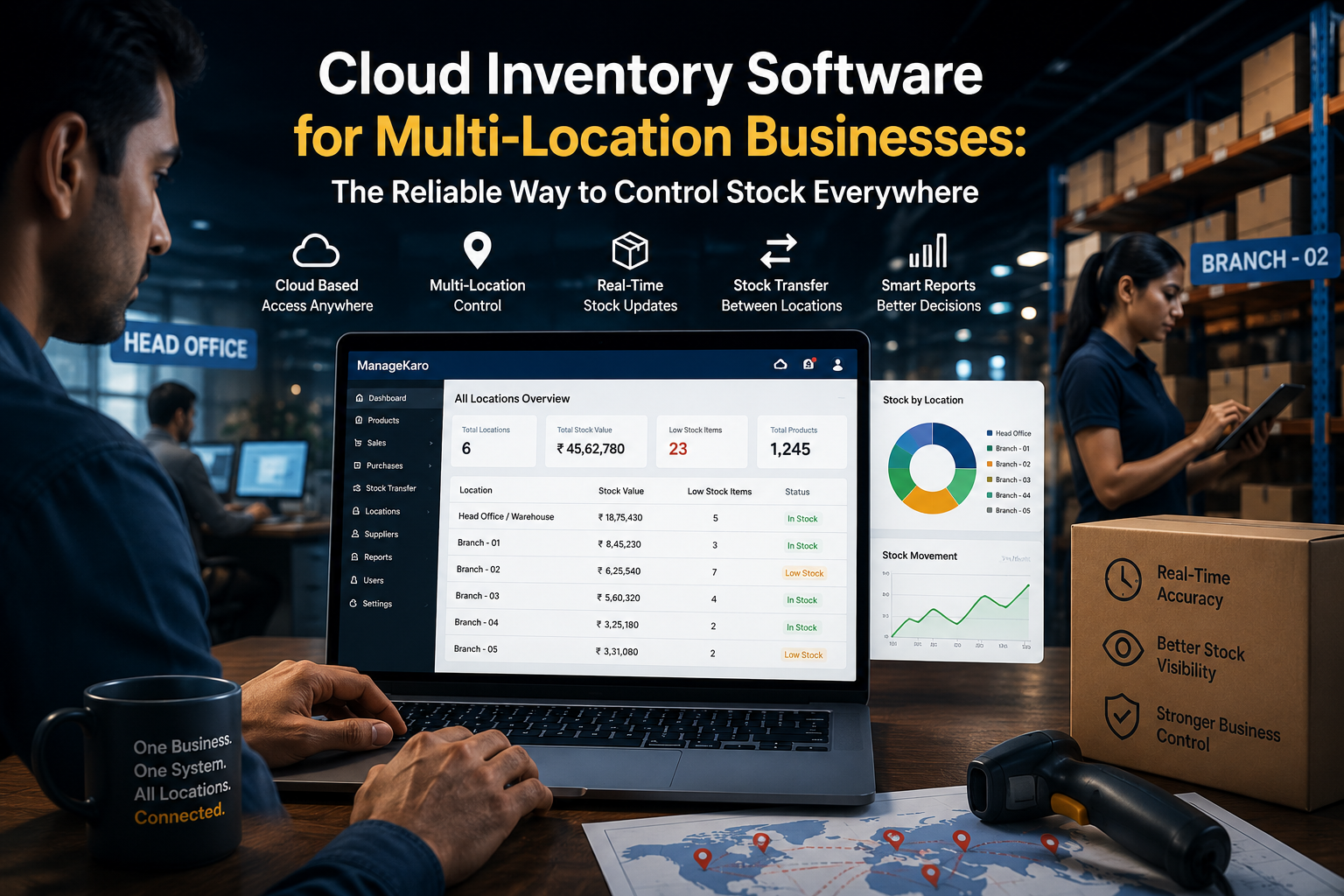
For businesses searching for cloud inventory software for multi-location businesses, the main goal is to control stock across branches, warehouses, stores, and operating locations from one connected system. Multi-location businesses need clear visibility into where products are available, which locations are running low, and where stock transfers may be needed.
Traditional stock tracking through notebooks, spreadsheets, WhatsApp messages, or separate branch records can create confusion as the business grows. One location may run out of stock while another location has extra inventory. Without location-wise visibility, businesses may over-purchase, miss sales, or delay customer orders.
ManageKaro helps businesses manage inventory, billing, sales, purchases, suppliers, expenses, customer balances, ledgers, and reports in one connected business management system. This helps owners improve stock visibility across different locations and make better decisions about reordering, transfers, and branch performance.
Businesses should choose multi-location cloud inventory software when they need:
- Location-wise stock visibility
- Branch and warehouse inventory control
- Stock transfer tracking between locations
- Low-stock and out-of-stock alerts by branch
- Sales and billing connection across locations
- Purchase and supplier record management
- Centralized reports for owners and managers
- Better coordination between teams and branches
For growing businesses, ManageKaro provides a practical way to manage stock across multiple locations, reduce scattered records, improve team coordination, and keep business operations under stronger control.
Quick Answer: What Is Cloud Inventory Software for Multi-Location Businesses?
Cloud inventory software for multi-location businesses helps owners track stock, sales, purchases, transfers, low-stock items, suppliers, and reports across multiple branches or warehouses from one connected system. It helps businesses see where stock is available, which location needs products, and how inventory is moving across the company.
ManageKaro helps businesses manage inventory together with billing, sales, purchases, suppliers, expenses, customer balances, ledgers, and reports in one connected system, making it easier to control stock across different business locations.
Why Multi-Location Inventory Is Difficult
A business with one location can often rely on direct supervision. The owner can check shelves, ask staff, and review stock physically.
But when the business expands to more than one location, inventory control becomes more complex.
Common problems include:
- One branch running out of stock
- Another branch holding excess stock
- Delayed stock updates
- Poor communication between locations
- Duplicate purchases
- Confusion over stock transfers
- Inconsistent product records
- Different teams using different stock files
- Owners depending on phone calls for updates
These problems become more serious as the business grows.
Signs Your Business Needs Multi-Location Inventory Software
1. You Cannot See Stock Across All Locations
If you need to call each branch to ask what is available, your inventory system is slowing you down.
A multi-location business needs a clear view of stock across branches, warehouses, and sales points.
2. Some Locations Run Out While Others Have Extra Stock
This is one of the most common multi-location inventory problems.
A product may be out of stock in one branch, while another branch has enough quantity available. Without location-wise visibility, the business may place a new purchase order instead of transferring existing stock.
3. Stock Transfers Are Not Properly Recorded
When products move from one branch to another, the movement should be recorded clearly.
If transfers are handled through informal messages or phone calls, stock records can become inaccurate.
4. Branch Managers Use Different Records
One branch may use a spreadsheet. Another may use a notebook. The warehouse may use invoices. The owner may receive updates on WhatsApp.
This creates different versions of the truth.
5. Reports Do Not Show Location-Wise Performance
Owners need to know which location is selling more, which branch has slow-moving stock, and where products need attention.
Without location-wise reports, expansion decisions become guesswork.
What Multi-Location Cloud Inventory Software Should Include
The best cloud inventory software for multi-location businesses should do more than count products.
It should help owners understand inventory movement across the whole business.
Location-Wise Stock Visibility
The system should show available stock by branch, warehouse, or location.
This helps teams answer:
- Which location has this product?
- Which branch is running low?
- Where is stock overfilled?
- Which location needs reordering?
- Can we transfer stock instead of buying more?
Stock Transfer Tracking
Multi-location businesses often move products between branches.
A good system should help record stock transfers clearly so both sending and receiving locations stay updated.
Centralized Product Records
All locations should use the same product names, categories, prices, and codes.
This reduces confusion and makes reporting cleaner.
Sales and Billing Connection
When a sale happens at one location, inventory movement should be easier to review for that location.
This helps owners understand which branch sold what and how stock changed.
Purchase and Supplier Records
Purchases may be made for one location or distributed across several locations.
The system should help track supplier details, purchase history, product costs, and receiving records.
Low-Stock Alerts by Location
Low-stock alerts are more useful when they show which location needs attention.
A product may be healthy overall but running low at one specific branch.
Multi-User Access
Different staff members may need access at different locations.
A cloud-based system should support team usage while allowing owners to maintain control.
Reports Across Locations
Useful reports may include:
- Stock by location
- Sales by location
- Low-stock items by branch
- Fast-moving products by location
- Slow-moving stock by location
- Purchase activity
- Supplier activity
- Stock transfer history
These reports help owners make better decisions across the full business.
Benefits of Cloud Inventory Software for Multi-Location Businesses
Better Owner Control
Owners can review stock across locations without depending only on phone calls or manual updates.
Smarter Stock Transfers
Instead of buying more stock immediately, businesses can transfer products from locations with excess stock to locations that need it.
Fewer Stockouts
Location-wise low-stock visibility helps businesses act before shelves go empty.
Reduced Overstocking
Businesses can avoid buying products that are already available in another branch or warehouse.
Stronger Team Coordination
Sales teams, warehouse teams, branch managers, and owners can work with clearer stock records.
Better Customer Service
When staff know where products are available, they can guide customers more accurately.
Improved Expansion Decisions
Location-wise reports help owners understand which branches are performing well and which need operational support.
Cloud Inventory vs Manual Multi-Location Stock Control
| Area | Manual Multi-Location Tracking | Cloud Inventory Software |
|---|---|---|
| Stock visibility | Depends on staff updates | Easier location-wise visibility |
| Transfers | Often informal | Easier to record and review |
| Reports | Difficult to prepare | Easier branch-wise reporting |
| Reordering | Based on estimates | Based on clearer stock data |
| Communication | Calls and messages | Shared system records |
| Owner control | Limited when away | Better remote visibility |
| Errors | Higher risk | Better structure and tracking |
Manual tracking may work for one location, but it becomes difficult when the business grows.
How ManageKaro Helps Multi-Location Businesses
ManageKaro helps businesses manage daily operations through one connected business management system.
For multi-location inventory control, ManageKaro helps businesses organize:
- Product records
- Stock levels
- Sales and billing records
- Purchase records
- Supplier information
- Customer balances
- Expenses
- Ledgers
- Reports
- Low-stock and out-of-stock visibility
- Product movement records
This gives business owners a stronger foundation for controlling stock across different branches, warehouses, or operating points.
Instead of depending on scattered registers, spreadsheets, and staff messages, businesses can use ManageKaro to keep operations more organized and easier to review.
Practical Multi-Location Inventory Routine
Daily
Review:
- Low-stock items by location
- Sales activity by branch
- New stock received
- Products requested by customers
- Any urgent stock transfer needs
Weekly
Review:
- Overstocked products
- Slow-moving stock by location
- Branch-wise purchase needs
- Supplier activity
- Stock transfer records
Monthly
Review:
- Stock value by location
- Best-performing branches
- Product movement trends
- Cash tied up in inventory
- Reorder strategy for each location
This routine helps businesses avoid stock confusion and manage inventory more strategically.
Common Mistakes Multi-Location Businesses Should Avoid
Using Different Product Names in Different Branches
If one branch writes “USB Cable” and another writes “Mobile Cable,” reports become confusing.
Not Recording Transfers Properly
Every stock movement between locations should be recorded.
Reordering Without Checking Other Locations
Before buying new stock, check whether another location has excess quantity.
Giving Everyone Full Access
Staff should have access based on their role. Owners should maintain control over sensitive records.
Ignoring Branch-Wise Reports
Location-wise reports help businesses understand where stock is performing well and where improvement is needed.
Final Thoughts
Multi-location inventory control requires more than manual updates and staff messages.
As businesses grow, owners need better visibility across branches, warehouses, sales points, and teams.
Cloud inventory software helps businesses track stock everywhere, reduce stockouts, avoid duplicate purchases, manage transfers, and make better decisions from location-wise reports.
With ManageKaro, businesses can manage inventory together with billing, sales, purchases, suppliers, expenses, customer balances, ledgers, and reports in one connected system—helping owners control stock across locations with more confidence.
Multi-Location Cloud Inventory Software: Quick Answers
Helpful answers for business owners managing stock across branches, warehouses, stores, or multiple operating locations.
Cloud inventory software for multi-location businesses helps owners track stock, sales, purchases, transfers, suppliers, low-stock items, and reports across multiple branches or warehouses from one connected system. ManageKaro helps businesses manage inventory together with billing, sales, purchases, suppliers, expenses, customer balances, ledgers, and reports.
Multi-location stock control is important because it helps businesses avoid stockouts, overstocking, duplicate purchases, transfer confusion, and wrong availability updates across branches. It gives owners better visibility into where products are available and which location needs attention.
Yes. Cloud inventory software can help businesses record and review stock transfers between branches, warehouses, or locations. This keeps sending and receiving locations clearer and reduces confusion when products move across the business.
Multi-location inventory software should include location-wise stock visibility, stock transfer tracking, low-stock alerts by branch, sales and billing connection, purchase records, supplier management, user roles, and reports. These features help owners control stock across every location.
ManageKaro helps multi-location businesses manage inventory, billing, sales, purchases, suppliers, expenses, customer balances, ledgers, and reports in one connected system. This gives owners better visibility and control across branches, warehouses, and teams.