Many business owners start with a simple cash register or basic billing software.
At the beginning, this may feel enough. The business only needs to record sales, calculate totals, receive cash, and print receipts. But as products increase, staff members join, customers ask for faster service, and owners need better reports, a basic cash register starts showing its limits.
A modern POS system does more than process sales.
It connects billing with inventory, payments, customers, purchases, suppliers, expenses, ledgers, and reports. This gives business owners better visibility and stronger control over daily operations.
So, which is better for your business: cash register software or a modern POS system?
The answer depends on how simple or complex your business operations are. But for most growing businesses, a modern POS system is the better long-term choice.
Quick Answer: Cash Register Software vs Modern POS System
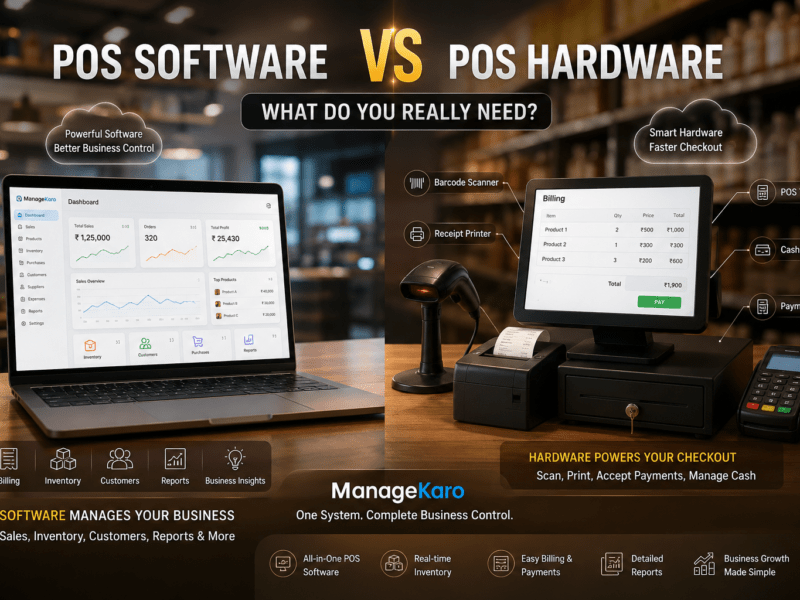
Cash register software mainly helps businesses record sales, calculate totals, accept payments, and print receipts. A modern POS system does all of that plus inventory tracking, customer records, purchase management, supplier tracking, reports, staff access, discounts, returns, and business insights.
ManageKaro helps business owners manage modern POS billing together with inventory, sales, purchases, suppliers, expenses, customer balances, ledgers, and reports in one connected system.
What Is Cash Register Software?
Cash register software is a basic sales recording tool.
It is usually used to:
- Enter items
- Calculate bill totals
- Record payments
- Print receipts
- Track basic daily sales
- Handle cash transactions
Cash register software is often suitable for very small businesses with simple sales and limited product tracking needs.
It works well when the business only needs basic billing.
However, it may not provide full inventory control, detailed reports, purchase tracking, supplier records, customer balances, or business management features.
What Is a Modern POS System?
A modern POS system is a more complete business tool.
It helps businesses manage:
- POS billing
- Sales records
- Inventory
- Product records
- Payments
- Customers
- Discounts
- Returns
- Purchases
- Suppliers
- Expenses
- Customer balances
- Ledgers
- Reports
- Staff access
- Low-stock visibility
A modern POS system is designed for businesses that want more than a receipt.
It helps owners understand what is selling, what is running low, how much money came in, which customers have balances, which suppliers were used, and how the business is performing.
Cash Register Software vs Modern POS System: Main Difference
| Area | Cash Register Software | Modern POS System |
|---|---|---|
| Main purpose | Basic sales and receipts | Complete sales and business control |
| Billing | Yes | Yes |
| Inventory tracking | Limited or unavailable | Stronger inventory connection |
| Reports | Basic sales reports | Sales, stock, purchases, expenses, and business reports |
| Customer records | Limited | Customer records and balances |
| Purchase management | Usually not included | Purchase and supplier tracking |
| Low-stock visibility | Usually not included | Helps identify low-stock items |
| Staff access | Limited | Multi-user and role-based workflows |
| Growth support | Limited | Better for growing businesses |
A cash register helps complete sales. A modern POS system helps manage the business.
Why Cash Registers Are No Longer Enough for Growing Businesses
Cash registers were designed for simple transactions.
But modern businesses need more information.
A business owner may need to know:
- Which product sold the most?
- Which product is low in stock?
- How much cash came in today?
- Which customer still has a balance?
- Which supplier provided stock?
- What purchases were made this week?
- Which products are slow-moving?
- What expenses were recorded?
- What is the daily profit picture?
A cash register may not answer these questions clearly.
A modern POS system can help business owners manage these details from one connected system.
Benefits of Cash Register Software
Cash register software can still be useful for very simple businesses.
Simple to Use
Basic cash register systems are usually easy to understand.
Staff can enter sales, calculate totals, and print receipts without much training.
Lower Initial Cost
Some cash register tools may be cheaper than full POS systems.
This can be attractive for very small businesses with limited needs.
Fast Basic Billing
For businesses that only need quick cash sales, a cash register can handle basic transactions.
Good for Very Small Operations
A small counter with limited products and no complex inventory may manage with a cash register at the start.
Limitations of Cash Register Software
Weak Inventory Control
If your cash register does not connect with inventory, stock must be updated manually.
This can lead to stock mismatches and missed sales.
Limited Reports
Basic reports may show total sales, but not product performance, low-stock items, purchase history, supplier activity, or customer balances.
Poor Customer Tracking
Businesses that sell on credit or manage repeat customers need better customer records.
Cash registers usually do not support this properly.
No Purchase or Supplier Management
Inventory starts with purchases.
If your system does not track purchases and suppliers, you may not understand product costs or supplier activity clearly.
Harder to Grow
As products, staff, customers, and locations increase, basic cash register software may not be enough.
Benefits of a Modern POS System
Faster and Smarter Billing
Modern POS systems help staff create bills faster with product search, barcode support, saved prices, discounts, and payment method tracking.
Better Inventory Visibility
When sales and inventory are connected, stock movement becomes easier to review.
Business owners can see what is available, what is low, and what needs reordering.
More Useful Reports
A modern POS system can provide reports for:
- Daily sales
- Product-wise sales
- Low-stock items
- Out-of-stock items
- Purchases
- Suppliers
- Customer balances
- Expenses
- Ledgers
- Business performance
These reports help owners make better decisions.
Customer Balance Tracking
Many businesses allow credit sales, partial payments, or customer accounts.
A modern POS system can help track customer balances more clearly.
Purchase and Supplier Control
A modern POS system connected with purchase and supplier records helps owners understand what was bought, from whom, and at what cost.
Better Staff Accountability
Modern POS systems can support multiple users, helping owners review staff activity, billing records, discounts, and daily transactions.
Better Growth Support
A modern POS system is more suitable for businesses that plan to grow products, staff, counters, branches, or reporting needs.
Which Businesses Can Use Cash Register Software?
Cash register software may fit businesses that:
- Have very few products
- Only need basic billing
- Do not track detailed inventory
- Do not manage customer balances
- Do not need purchase records
- Have one staff member
- Have low sales volume
- Do not need detailed reports
For very simple operations, cash register software can be enough in the beginning.
Which Businesses Need a Modern POS System?
A modern POS system is better for businesses that:
- Sell many products
- Need inventory tracking
- Use barcode scanning
- Manage purchases
- Work with suppliers
- Track customer balances
- Need daily reports
- Have multiple staff members
- Handle discounts or returns
- Want better cash closing
- Plan to grow
- Need business visibility
For most small and growing businesses, a modern POS system is more practical.
Cash Register vs POS: Real Business Example
Imagine a retail shop selling groceries, cosmetics, or mobile accessories.
With cash register software, staff can create bills and print receipts. But the owner may still need separate registers for stock, purchases, expenses, customers, and suppliers.
At the end of the day, the owner may ask staff:
- How much stock is left?
- Which products need reordering?
- Which customer has balance?
- What was purchased today?
- What was the real sales performance?
With a modern POS system like ManageKaro, billing, inventory, purchases, suppliers, customer balances, expenses, ledgers, and reports are managed in a more connected way.
This makes daily operations clearer and easier to control.
How ManageKaro Helps Businesses Move Beyond Cash Registers
ManageKaro helps business owners manage POS billing and business operations in one connected system.
With ManageKaro, businesses can manage:
- POS billing
- Sales records
- Inventory
- Product records
- Purchases
- Suppliers
- Expenses
- Customer balances
- Ledgers
- Reports
- Low-stock visibility
- Out-of-stock products
This helps business owners move from simple cash register records to a more complete system for daily business control.
Instead of using separate tools for billing, stock, purchases, suppliers, expenses, and customer balances, ManageKaro helps organize everything in one connected platform.
When Should You Upgrade From Cash Register Software to POS?
You should consider upgrading when:
- You often face stock mismatches
- Billing mistakes are increasing
- Daily sales reports are unclear
- You cannot track customer balances easily
- Purchases and suppliers are scattered
- Staff members depend on notebooks or WhatsApp updates
- You do not know which products are profitable
- Cash closing takes too much time
- Your business has more products than before
- You are planning to grow
These are signs that your business needs more than basic billing.
Final Verdict: Which Is Better?
Cash register software is better for very small businesses with simple billing needs.
A modern POS system is better for businesses that need inventory control, reports, customer balances, purchases, suppliers, staff access, and growth support.
For business owners who want better control, a modern POS system is the stronger choice.
ManageKaro gives small and growing businesses a connected way to manage POS billing, inventory, purchases, suppliers, expenses, customer balances, ledgers, and reports—helping owners move beyond basic cash register software and manage operations more confidently.
Frequently Asked Questions
What is the difference between cash register software and a POS system?
Cash register software mainly records sales, calculates totals, accepts payments, and prints receipts. A modern POS system also manages inventory, customers, purchases, suppliers, expenses, ledgers, and reports.
Is a cash register enough for a small business?
A cash register may be enough for a very small business with simple billing needs, few products, and no detailed inventory or customer balance tracking.
Why is a modern POS system better?
A modern POS system is better because it connects billing with inventory, reports, purchases, suppliers, customer balances, expenses, and business records, giving owners better control.
When should a business upgrade from cash register software?
A business should upgrade when it needs inventory tracking, low-stock visibility, customer balance records, purchase management, supplier tracking, staff access, or detailed reports.
How can ManageKaro help replace basic cash register software?
ManageKaro helps businesses manage POS billing, inventory, sales, purchases, suppliers, expenses, customer balances, ledgers, and reports in one connected system, making it easier to manage daily operations.