Running a hardware store is not as simple as selling products and collecting payments. Hardware retailers often manage thousands of items, including screws, nuts, bolts, electrical wires, plumbing supplies, paint, tools, pipes, construction materials, and spare parts.
Many of these products look similar but have different sizes, specifications, prices, and measurement units.
For example, a customer might purchase 20 screws, five metres of electrical wire, two paint buckets, and three PVC pipes in a single transaction.
Without an organized billing and inventory system, employees may struggle to identify the correct products, calculate prices, and update stock records accurately.
This is where POS software for hardware stores becomes valuable.
A suitable point of sale system helps hardware retailers organize billing, product catalogues, inventory, purchases, customer balances, and financial records.
With ManageKaro, hardware businesses can connect important operations such as POS billing, inventory management, supplier purchases, customer ledgers, expenses, and financial reporting.
In this guide, we’ll explore how hardware store POS software works, which features matter most, and how retailers can manage large product catalogues more efficiently.
What Is POS Software for Hardware Stores?
POS software for hardware stores is a point of sale system designed to help hardware retailers process transactions, organize product information, manage inventory, record customer payments, and monitor business operations.
Unlike a simple cash register, modern POS software can connect sales transactions with inventory and financial records.
Hardware retailers may also require specialized features for product variants, different measurement units, bulk pricing, contractor accounts, and warehouse locations.
Quick Answer: What Does Hardware Store POS Software Do?
Hardware store POS software helps retailers manage product billing, inventory quantities, supplier purchases, customer credit, and sales reporting. Suitable systems can also support product variations, unit conversions, barcode scanning, and bulk orders, making it easier to manage thousands of hardware products accurately.
Why Hardware Stores Need Specialized POS Software
Hardware businesses face several operational challenges that make inventory and billing more complicated than in many other retail industries.
Managing Thousands of Different Products
A hardware store may stock hundreds of screws, bolts, nuts, pipes, fittings, switches, cables, and tools.
Even products belonging to the same category may have different specifications.
For example, electrical wires can differ by:
- Brand
- Wire gauge
- Conductor material
- Insulation type
- Colour
- Length
- Price per metre or roll
If employees select the wrong variation, the business may record incorrect sales and stock quantities.
Selling Products in Different Units
Hardware retailers frequently sell products in pieces, boxes, metres, kilograms, litres, rolls, and packets.
A billing system must accurately handle the units used by the business.
Frequent Price Changes
Hardware product costs may change because of supplier pricing, material costs, exchange rates, or market demand.
Outdated selling prices can reduce margins or cause billing disputes.
Contractor and Customer Credit
Many hardware stores sell products to contractors, electricians, plumbers, builders, and regular business customers on credit.
Without organized ledgers, tracking outstanding payments becomes difficult.
Complex Supplier Purchases
Hardware businesses may purchase products from several distributors and wholesalers.
Accurate purchasing records help owners understand stock costs, supplier balances, and replenishment requirements.
Essential Features of a Hardware Store POS System
The right hardware POS software should support the store’s daily operations and product structure.
Large Product Catalogue Management
Hardware retailers need organized product records.
A useful product catalogue may include:
| Product information | Example |
|---|---|
| Product name | PVC Pipe |
| Category | Plumbing |
| Specification | 1-inch diameter |
| Brand | Example Brand |
| SKU | PVC-1IN-001 |
| Selling unit | Piece |
| Selling price | PKR 450 |
| Available stock | 120 pieces |
Each variation should have a clearly identifiable product record.
This helps employees find the correct product and reduces the risk of billing mistakes.
Barcode Scanning and Product Search
Barcode scanning can make checkout faster for packaged and labelled hardware products.
However, some loose hardware items may not have manufacturer barcodes.
For these products, retailers may need internal product codes, barcode labels, or searchable product records.
Multiple Measurement Units
Hardware stores should evaluate whether POS software can support their required measurement units.
Examples include:
- Screws sold individually or by box
- Electrical wire sold by metre or roll
- Paint sold by litre or container
- Nails sold by kilogram
- PVC pipes sold by piece or length
Accurate unit configuration is essential for correct billing and stock deductions.
Inventory Management
Integrated inventory management helps retailers monitor available stock, record purchases, and identify products requiring replenishment.
Customer Ledger Management
Hardware retailers often maintain long-term relationships with contractors and business customers.
Customer ledgers help track credit purchases, payments, and outstanding balances.
Purchase and Supplier Management
Connected purchase records help retailers organize product procurement and supplier transactions.
Sales and Financial Reporting
Useful reports help owners understand daily sales, product demand, expenses, collections, and business performance.
How to Manage Thousands of Hardware Products Efficiently
Managing a large hardware inventory requires consistent product organization.
Step 1: Create Clear Product Categories
Divide products into meaningful categories.
| Category | Example products |
|---|---|
| Electrical | Wires, switches, sockets, circuit breakers |
| Plumbing | Pipes, fittings, taps, valves |
| Fasteners | Screws, nuts, bolts, nails |
| Paint | Paint buckets, brushes, rollers |
| Tools | Hammers, drills, screwdrivers |
| Construction | Adhesives, cement accessories, fittings |
| Safety equipment | Gloves, helmets, protective glasses |
A consistent category structure helps employees locate products and supports more useful reporting.
Step 2: Assign Unique Product Codes
Products with similar names should have distinct stock keeping units (SKUs).
For example:
| Product | SKU |
|---|---|
| PVC Pipe 1 inch | PVC-1IN-001 |
| PVC Pipe 2 inch | PVC-2IN-001 |
| PVC Pipe 3 inch | PVC-3IN-001 |
| Electrical Wire 1.5 mm² | WIRE-1.5-001 |
| Electrical Wire 2.5 mm² | WIRE-2.5-001 |
These are illustrative internal product codes.
Step 3: Record Product Specifications
Employees should be able to distinguish products by size, material, brand, colour, and other important specifications.
Step 4: Organize Shelf and Storage Locations
For larger stores, product records may benefit from shelf, rack, or warehouse location information.
For example, electrical fittings could be stored in Rack E-03, while plumbing fittings are stored in Rack P-02.
This can reduce the time employees spend searching for products.
Step 5: Maintain Accurate Stock Records
Sales, purchases, returns, and inventory adjustments should be recorded consistently.
Explore ManageKaro inventory management software to learn more about connected stock management.
How to Handle Pieces, Boxes, Metres, and Kilograms
One of the biggest challenges in hardware retail is managing products sold in different units.
Example 1: Screws Sold by Box and Piece
Imagine a hardware store purchases screws in boxes.
Each box contains 100 screws.
The store receives five boxes and already has 30 loose screws.
Total inventory:
5 × 100 + 30 = 530 screws
A customer purchases two boxes and 15 individual screws.
Quantity sold:
2 × 100 + 15 = 215 screws
Remaining stock:
530 − 215 = 315 screws
A POS system with correctly configured unit conversions can help maintain consistent quantities when products are sold in different packaging units.
Example 2: Electrical Wire Sold by Metre
A hardware retailer purchases a 100-metre roll of electrical wire.
During the day, customers purchase:
| Transaction | Quantity |
|---|---|
| Customer A | 15 metres |
| Customer B | 20 metres |
| Customer C | 8 metres |
| Total sold | 43 metres |
Remaining stock:
100 − 43 = 57 metres
The store should maintain inventory in a consistent base unit, such as metres, even when purchasing full rolls.
Example 3: Paint Sold in Different Containers
Paint may be available in one-litre, four-litre, and ten-litre containers.
If these are separately packaged products, the retailer may maintain distinct SKUs for each size.
If the store also dispenses paint from bulk containers, it may require additional measurement and inventory procedures.
Important: Multi-unit billing, automated conversions, and measured-product workflows should be verified before selecting hardware POS software.
How POS Software Improves Hardware Store Billing
Hardware checkout often involves several product categories and measurement units in one transaction.
A structured POS system can reduce manual calculations and improve billing accuracy.
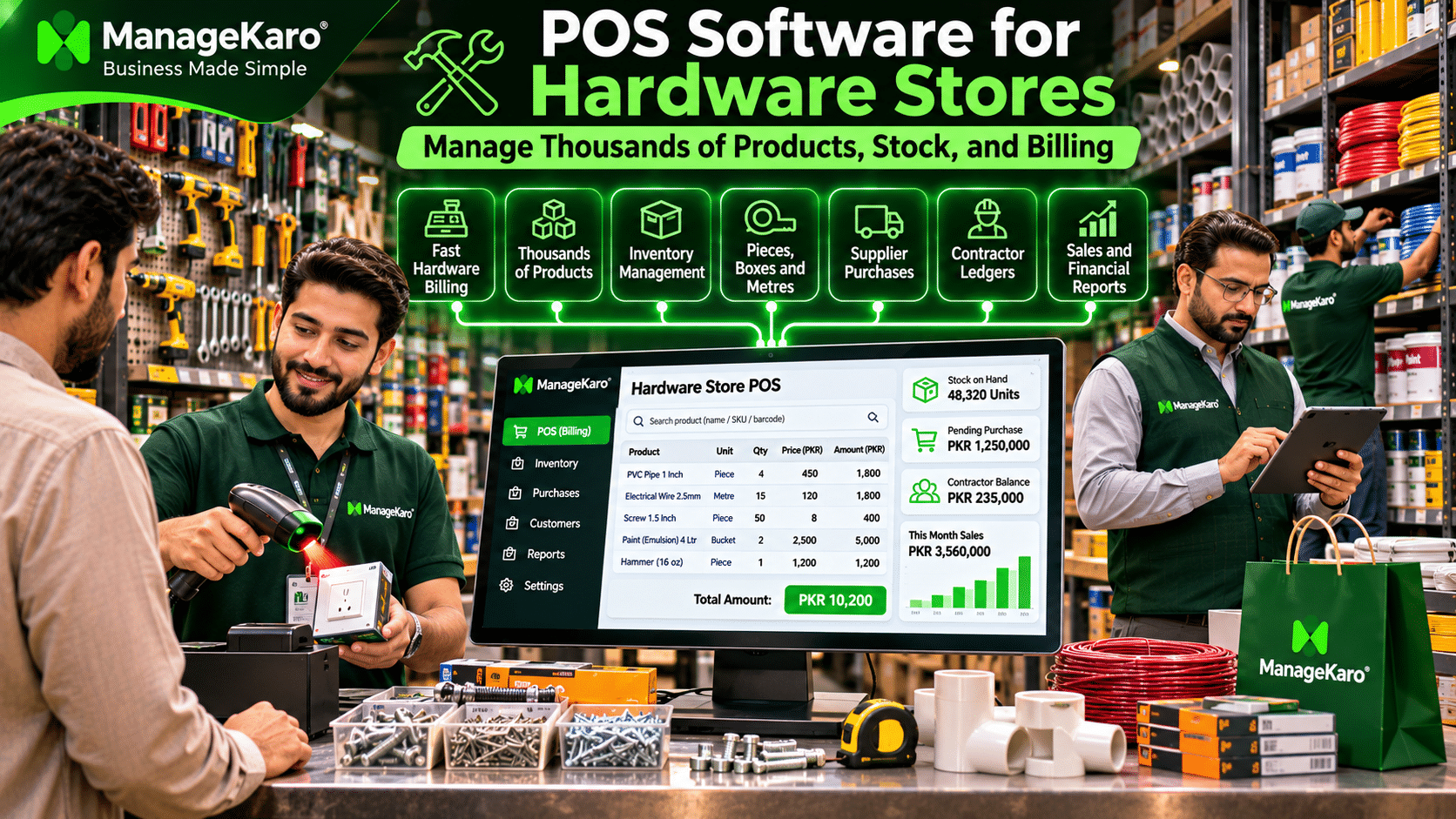
Example of a Hardware Store Sale
| Product | Quantity | Unit price | Total |
|---|---|---|---|
| PVC Pipe | 4 pieces | PKR 450 | PKR 1,800 |
| Electrical Wire | 15 metres | PKR 120 | PKR 1,800 |
| Screws | 50 pieces | PKR 8 | PKR 400 |
| Paint | 2 buckets | PKR 2,500 | PKR 5,000 |
| Hammer | 1 piece | PKR 1,200 | PKR 1,200 |
| Total | PKR 10,200 |
Instead of calculating every item manually, POS software calculates the transaction using the configured quantities and selling prices.
When billing and inventory are connected, completed sales can also update the corresponding stock records.
Benefits of Organized Hardware Billing
- Faster product identification
- Fewer manual calculation errors
- Consistent product pricing
- Better transaction records
- More accurate stock deductions
- Easier review of customer purchases
How to Manage Hardware Store Inventory and Prevent Stockouts
Inventory shortages can affect both walk-in customers and contractors working on active projects.
For example, a plumber may need a particular pipe fitting immediately. If the product is unavailable, the customer may purchase it elsewhere.
Monitor Fast-Moving Products
Hardware stores should identify products with consistent demand.
These may include screws, electrical tape, common fittings, switches, and frequently used tools.
Establish Reorder Levels
A reorder level indicates when the business should consider replenishing a product.
| Product | Available stock | Reorder level | Status |
|---|---|---|---|
| PVC Elbow | 25 | 40 | Reorder |
| Electrical Tape | 80 | 30 | Sufficient |
| Steel Nails | 12 kg | 20 kg | Reorder |
| Screwdriver | 35 | 15 | Sufficient |
| Circuit Breaker | 8 | 20 | Reorder |
Reorder levels should reflect product demand, supplier lead times, and purchasing costs.
Identify Slow-Moving Inventory
Some hardware products may remain unsold for months.
These products occupy storage space and tie up working capital.
Retailers should review slow-moving inventory before placing additional orders.
Conduct Regular Stock Counts
Physical stock counts help identify discrepancies caused by incorrect billing, damaged products, misplaced inventory, or unrecorded stock movements.
How to Manage Supplier Purchases and Changing Product Costs
Hardware retailers often purchase products from multiple suppliers.
A business may purchase electrical items from one distributor, plumbing supplies from another, and tools from a separate wholesaler.
Maintain Supplier Records
Supplier records should include relevant contact details, purchase history, payment terms, and outstanding balances.
Record Purchase Costs
Accurate purchase costs are important for pricing and profitability analysis.
For example:
| Product | Previous cost | New cost | Change |
|---|---|---|---|
| PVC Pipe | PKR 320 | PKR 350 | +PKR 30 |
| Electrical Wire | PKR 90/m | PKR 105/m | +PKR 15/m |
| Hammer | PKR 850 | PKR 900 | +PKR 50 |
If purchase costs increase while selling prices remain unchanged, the retailer’s gross margin may decrease.
Review Supplier Payment Obligations
Outstanding supplier payments should be monitored alongside customer collections and operating expenses.
Verify Goods Received
When new inventory arrives, employees should compare delivered quantities and specifications with the purchase records.
This is especially important for products with similar sizes or technical specifications.
How to Track Contractor Credit and Outstanding Payments
Hardware stores frequently supply materials to electricians, plumbers, construction contractors, and repair businesses.
These customers may purchase products repeatedly and settle their balances later.
Example of a Contractor Ledger
| Transaction | Amount |
|---|---|
| Previous outstanding balance | PKR 25,000 |
| New material purchase | +PKR 18,000 |
| Customer payment | −PKR 20,000 |
| Remaining balance | PKR 23,000 |
A customer ledger helps the store maintain a clear record of purchases and payments.
Why Contractor Credit Tracking Matters
Without organized records, hardware retailers may experience:
- Forgotten credit sales
- Incorrect outstanding balances
- Delayed payment follow-ups
- Disagreements about previous purchases
- Cash-flow problems
ManageKaro’s financial management functionality helps businesses organize customer balances, ledgers, and related financial records.
Explore the ManageKaro financial module.
How to Manage Bulk Orders and Contractor Pricing
Hardware stores often serve both individual customers and businesses purchasing materials in large quantities.
For example, a walk-in customer may purchase ten screws, while a contractor purchases 2,000 screws.
These transactions may require different pricing arrangements.
Example of Quantity-Based Pricing
| Order quantity | Illustrative unit price |
|---|---|
| 1–99 screws | PKR 8 |
| 100–499 screws | PKR 7 |
| 500+ screws | PKR 6 |
A suitable POS system may support authorized price levels, customer-specific pricing, or bulk discounts.
Retailers should verify these capabilities before implementation.
Maintain Accurate Bulk Sales Records
Large orders should clearly record quantities, prices, discounts, payment terms, and delivery requirements.
This helps reduce disputes and supports inventory planning.
How to Measure Hardware Store Profitability
Hardware retailers should not evaluate business performance through sales revenue alone.
Product purchase costs, discounts, damaged inventory, and operating expenses all affect profitability.
Example of Daily Hardware Store Performance
| Financial activity | Amount |
|---|---|
| Net sales | PKR 150,000 |
| Cost of goods sold | PKR 110,000 |
| Gross profit | PKR 40,000 |
| Operating expenses | PKR 15,000 |
| Illustrative operating profit | PKR 25,000 |
This simplified example excludes taxes, financing costs, depreciation, and other applicable accounting adjustments.
Product-Wise Profitability
Different hardware products may have different profit margins.
For example, electrical accessories may produce a different margin from construction materials or power tools.
Tracking product costs and sales values helps owners understand which categories contribute to gross profit.
Manual Hardware Store Billing vs Modern POS Software
| Feature | Manual billing | Modern hardware POS |
|---|---|---|
| Product identification | Manual search | Digital product catalogue |
| Billing calculations | Calculator or handwritten invoice | Software-based calculations |
| Inventory records | Registers or spreadsheets | Connected stock records |
| Product variations | Difficult to organize | Structured SKU records |
| Multiple selling units | Manual conversion | Supported in suitable systems |
| Customer credit | Handwritten ledgers | Digital customer records |
| Supplier purchases | Separate registers | Organized purchase records |
| Sales reporting | Manual summaries | System-generated reports |
| Financial tracking | Separate calculations | Connected financial records |
Modern POS software can reduce repetitive administrative work, but accurate product configuration and employee training remain essential.
How ManageKaro Helps Hardware Store Owners
ManageKaro is an all-in-one business management and POS software platform designed to help small and growing businesses organize their daily operations.
POS Billing and Sales Management
ManageKaro helps retailers maintain sales transactions, product information, and billing records.
Explore the ManageKaro POS module.
Inventory Management
Hardware retailers can organize product records, stock quantities, and inventory-related activities.
Explore the ManageKaro inventory module.
Purchase and Supplier Management
ManageKaro helps businesses maintain purchase and supplier records, supporting more organized stock procurement.
Customer Ledger Management
Retailers can maintain customer balances and payment records, which are especially useful when selling materials on credit.
Expense and Financial Management
ManageKaro helps businesses organize expenses, financial transactions, and reports.
Connected Business Operations
By bringing sales, inventory, purchases, suppliers, customer records, and financial information into one platform, ManageKaro helps hardware retailers reduce dependence on disconnected manual records.
Businesses requiring automated unit conversion, bulk pricing rules, shelf-location tracking, or specialized hardware workflows should confirm their availability for the selected configuration.
How to Choose the Best POS Software for Hardware Stores
Before selecting a hardware POS system, evaluate the following requirements.
| Requirement | What to verify |
|---|---|
| Product catalogue | Can thousands of SKUs be organized? |
| Product variations | Can different sizes and specifications be distinguished? |
| Measurement units | Does it support required selling units? |
| Unit conversions | Can boxes, pieces, metres, and rolls be handled correctly? |
| Barcode scanning | Is compatible barcode hardware supported? |
| Inventory | Are sales and stock records connected? |
| Customer credit | Can contractor balances be maintained? |
| Supplier purchases | Can purchase records be organized? |
| Bulk pricing | Are required quantity-based prices supported? |
| Reporting | Are sales and financial reports available? |
| Offline functionality | What happens during internet interruptions? |
| Support | Is training and technical assistance available? |
| Pricing | What is the total software and hardware cost? |
Explore ManageKaro pricing when evaluating software options.
Common Hardware Store Management Mistakes to Avoid
Using Similar Names for Different Products
Products with different specifications should have unique, clearly identifiable records.
Mixing Measurement Units
Stock records should use consistent base units and verified conversions.
Ignoring Slow-Moving Products
Review unsold products before purchasing additional inventory.
Failing to Update Product Costs
Changing supplier prices can affect margins and pricing decisions.
Not Tracking Contractor Credit
Record credit purchases and customer payments consistently.
Depending Only on Sales Revenue
Review gross profit, operating expenses, inventory losses, and outstanding balances.
Skipping Physical Inventory Checks
Regular stock counts help identify discrepancies between recorded and actual quantities.
Final Thoughts
Managing a hardware store requires accurate billing, organized product information, reliable inventory records, and careful financial management.
With thousands of products, different specifications, multiple selling units, changing supplier costs, and contractor credit transactions, manual systems can become difficult to maintain.
A suitable POS system for hardware stores helps retailers organize these activities and make more informed business decisions.
ManageKaro brings POS billing, inventory management, supplier purchases, customer ledgers, expenses, and financial reporting into a connected business management platform.
Whether you operate a small neighbourhood hardware shop, electrical store, plumbing supply business, or growing construction materials retailer, organized business records can help improve operational control.
Ready to simplify your hardware store operations? Explore ManageKaro and discover a more connected approach to retail business management.
Frequently Asked Questions
What is POS software for hardware stores?
POS software for hardware stores helps retailers manage billing, product catalogues, inventory, customer payments, supplier purchases, and business reports.
What features should a hardware store POS system have?
A hardware store POS system should offer product catalogue management, accurate billing, inventory tracking, customer ledgers, supplier records, reporting, and support for required measurement units and product variations.
Can hardware POS software manage thousands of products?
Yes. POS systems designed for large product catalogues can organize thousands of products using categories, SKUs, barcodes, and product specifications. Actual capacity depends on the software.
How do hardware stores manage products sold in different units?
Hardware stores can maintain consistent base units and use verified unit conversions when purchasing or selling products in boxes, pieces, metres, kilograms, or rolls.
Can POS software track contractor credit?
POS software with customer ledger functionality can record credit purchases, payments received, outstanding balances, and transaction histories.
How can hardware stores prevent inventory shortages?
Retailers can monitor stock quantities, establish reorder levels, review fast-moving products, record purchases accurately, and conduct regular physical stock checks.
Is barcode scanning useful for hardware stores?
Yes. Barcode scanning helps employees identify packaged and labelled products quickly. Loose items may require internal product codes or barcode labels.
How does ManageKaro help hardware retailers?
ManageKaro connects POS billing, inventory management, purchases, suppliers, customer balances, expenses, ledgers, and financial reporting, helping hardware retailers maintain organized business records.
Is ManageKaro suitable for small hardware stores?
ManageKaro offers core POS and business management functionality relevant to small hardware retailers. Businesses should confirm specialized unit conversion, bulk pricing, and product configuration requirements before implementation.