
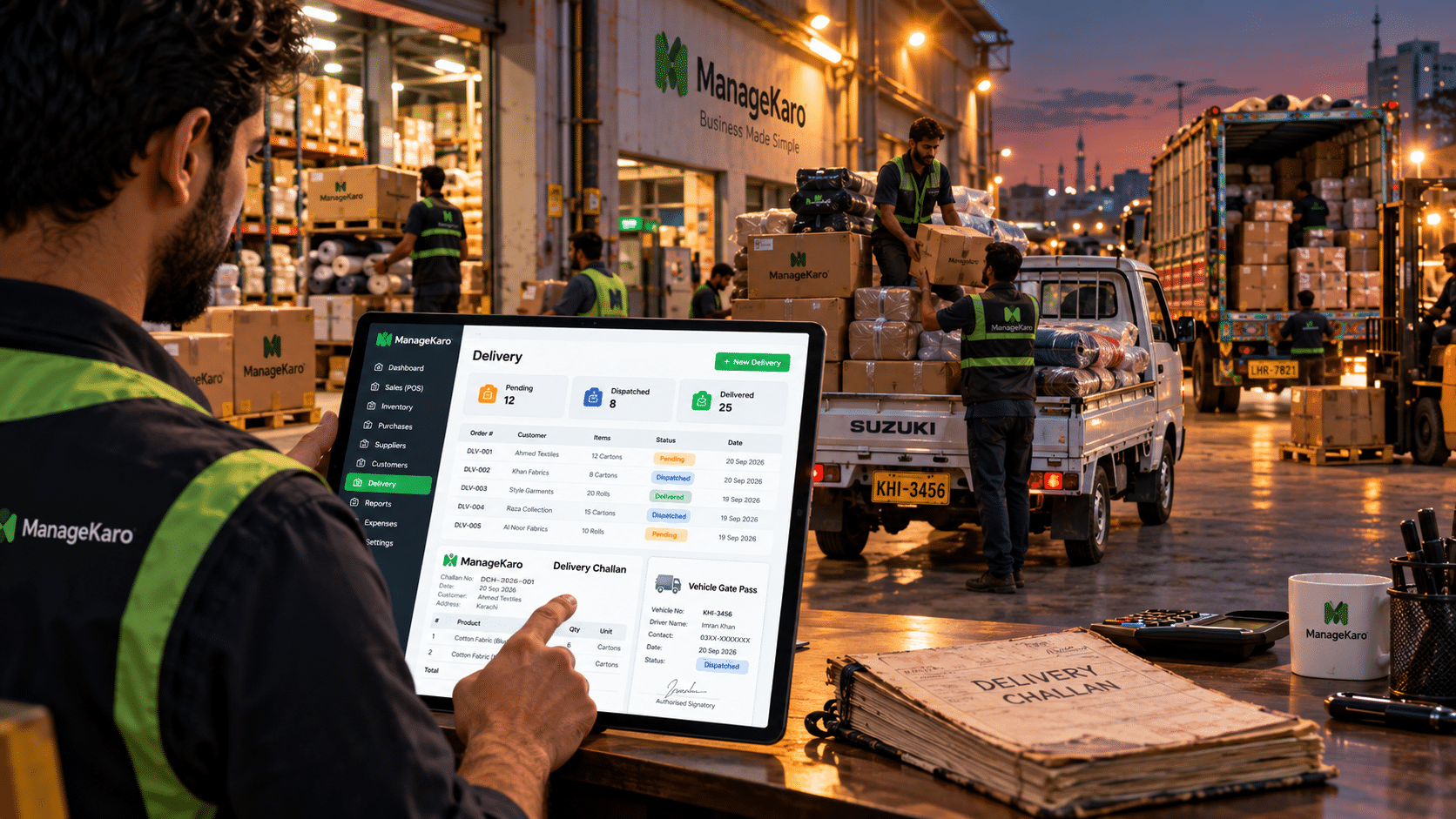
Every time goods leave your warehouse, shop, or factory, someone needs to record what left, where it went, and who took it.
For many Pakistani businesses, that record still lives in a carbon-copy challan book. It works until a customer disputes a delivery, a page goes missing, or you need to find a challan from three months ago.
Delivery challan software replaces the physical book with digital records. You create challans faster, keep a consistent format, track delivery status, and find any past challan in seconds.
This guide explains what a delivery challan is, what it should include, and how businesses can manage challans digitally.
Quick Answer: What Is Delivery Challan Software?
Delivery challan software is a digital system that helps businesses create, organize, and track delivery challans for goods being dispatched to customers or moved between locations.
Instead of writing challans by hand, businesses can generate challans in a consistent format, link them to delivery orders and vehicle records, track dispatch status, and keep a searchable history of every delivery.
ManageKaro includes delivery challan generation, delivery status tracking, vehicle gate pass records, and delivery history as part of its connected business management platform.
What Is a Delivery Challan?
A delivery challan is a document that records the movement of goods from one place to another. It lists what is being sent, how much, to whom, and usually which vehicle is carrying it.
A delivery challan is not a request for payment. Its main job is to document that goods were dispatched and, once signed, that they were received.
Delivery Challan vs Sales Invoice
| Point | Delivery Challan | Sales Invoice |
|---|---|---|
| Main purpose | Records movement of goods | Requests payment for a sale |
| Shows price | Optional | Always |
| Shows tax | Usually not | Yes, where applicable |
| Used for stock transfers | Yes | No |
| Signed on receipt | Commonly | Not always |
| Creates a customer balance | No | Yes |
Many businesses use both. The challan travels with the goods, and the invoice is issued at dispatch or later.
Tax and documentation rules differ by business type. Confirm your invoicing requirements with your tax advisor.
When Businesses Use a Delivery Challan
Common situations include:
- Dispatching goods to a customer before the invoice is issued
- Sending stock from a warehouse to a branch or retail outlet
- Delivering goods on approval or for sale-or-return
- Sending items for repair, processing, or job work
- Delivering partial quantities of a larger order
- Moving goods between your own warehouses
Problems With Manual Delivery Challan Books
A paper challan book creates problems that grow with your delivery volume.
Challans Are Hard to Find
When a customer says goods never arrived, someone has to search through stacks of old books. If the copy is torn, misplaced, or illegible, you have no record.
Formats Are Inconsistent
Different staff write challans differently. One writes the vehicle number, another forgets. One lists item codes, another writes descriptions. This makes disputes harder to resolve.
No Link to Stock or Orders
A handwritten challan does not update anything. Someone still has to adjust stock records, mark the order as dispatched, and inform the office.
No Visibility on Delivery Status
The owner cannot easily see which deliveries are pending, which are on the road, and which are complete without phoning drivers or checking registers.
Duplicate Data Entry
The same customer name, address, and item list gets written in the order book, the challan book, the gate register, and later the invoice.
Delivery Challan Format: What Should Be Included?
A clear delivery challan format protects both you and your customer. A standard challan usually includes the fields below.
Business and Customer Details
- Your business name and address
- Challan number
- Challan date
- Customer or receiving branch name
- Delivery address
- Contact person and phone number
Goods Details
- Item name or description
- Item code or SKU
- Quantity
- Unit (pieces, cartons, rolls, bags)
- Remarks, such as partial delivery or sample
Transport and Vehicle Details
- Vehicle number
- Driver name
- Dispatch time
- Order or invoice reference
Authorization
- Prepared by
- Authorized by
- Receiver’s signature and date
Sample Delivery Challan Format
| Field | Example |
|---|---|
| Challan No. | DC-1024 |
| Date | 14 Sep 2026 |
| Customer | Al-Noor Fabrics, Lahore |
| Delivery Address | Shop 12, Azam Cloth Market |
| Items | Cotton fabric roll: 40 rolls; packaging cartons: 120 |
| Vehicle No. | LES-4471 |
| Driver | M. Arshad |
| Order Reference | SO-3310 |
| Authorized By | Warehouse Manager |
| Received By | Signature and date |
Example data is illustrative.
How Delivery Challan Software Works
A digital delivery workflow usually follows five steps.
1. Record the Delivery Order
The customer order is entered with items, quantities, and delivery address.
2. Generate the Delivery Challan
The challan is created from the order details in a consistent format. No rewriting is needed.
3. Assign the Vehicle and Gate Pass
The vehicle, driver, and gate pass details are recorded against the delivery.
4. Update Delivery Status
The delivery moves from pending to dispatched to delivered, so the office always knows where things stand.
5. Keep a Digital History
Every challan stays searchable for future reference, disputes, and reporting.
Key Features to Look for in Delivery Challan Software
Digital Challan Generation
Create challans directly from order information instead of writing them by hand.
Consistent Challan Format
Every challan follows the same structure, whoever prepares it.
Delivery Status Tracking
See at a glance which deliveries are pending, dispatched, or delivered.
Vehicle Gate Pass Records
Link outgoing vehicles to the challans they carry, so your gate and warehouse teams have a clear record.
Searchable Delivery History
Find any past challan by customer, date, or challan number in seconds.
Connection With Inventory and Sales
Delivery records should work with your stock and sales data, not sit in a separate system.
Delivery Challans for Stock Transfers Between Warehouses
Challans are not only for customers. Businesses with more than one location regularly move stock between warehouses, branches, and outlets.
Without a proper record, transferred stock can go missing between locations, and branch stock counts stop matching.
Using a challan for every internal transfer gives you:
- A record of what left the sending location
- A record of what arrived at the receiving location
- A way to spot shortages during transit
- Clear accountability for each movement
ManageKaro supports stock transfers between warehouses and delivery records for goods moved between locations, helping multi-location businesses keep transfers documented.
Manual Challan Book vs Delivery Challan Software
| Area | Manual Challan Book | Delivery Challan Software |
|---|---|---|
| Creating challans | Handwritten each time | Generated from order details |
| Format | Varies by staff | Consistent every time |
| Finding old challans | Search through books | Search in seconds |
| Delivery status | Phone calls and guesswork | Visible status updates |
| Vehicle records | Separate gate register | Linked to the delivery |
| Data entry | Repeated in several books | Entered once |
| Disputes | Depends on paper copies | Digital record available |
| Storage | Shelves of old books | Centralized digital records |
Who Needs Delivery Challan Software?
Delivery challan software is useful for any business that regularly moves goods, including:
- Wholesalers dispatching bulk orders to retailers
- Distributors handling daily deliveries across areas
- Manufacturers sending finished goods to buyers
- Warehouses managing high-volume outgoing stock
- Parts and machinery businesses delivering to workshops and sites
- Retail stores offering home or business delivery
- Multi-location businesses transferring stock between branches
How ManageKaro Helps With Delivery Management
ManageKaro’s delivery module brings delivery orders, challans, vehicle records, and dispatch status into one place.
With ManageKaro, businesses can:
- Generate professional delivery challans
- Keep a consistent challan format across all deliveries
- Record vehicle gate passes for outgoing vehicles
- Track deliveries as pending, dispatched, or delivered
- Keep a searchable history of challans and dispatches
- Connect delivery activity with inventory, sales, and other business operations
Because delivery sits inside the same platform as POS, inventory, and financial management, your delivery records do not live in a separate book or spreadsheet.
Explore ManageKaro Delivery Management
Delivery Challan Software Setup Checklist
Before moving from paper to digital challans:
- Add your business details
- Add regular customers and delivery addresses
- Add products with codes and units
- Set up warehouses and branches
- Add vehicles and regular drivers
- Decide who can create and authorize challans
- Create a test challan
- Test a stock transfer challan between locations
- Train warehouse and dispatch staff
- Set a date to stop using the paper challan book
Common Delivery Challan Mistakes to Avoid
Skipping Challans for Internal Transfers
Moving stock between your own locations without a challan is one of the most common causes of stock mismatches.
Not Recording Vehicle Details
If a delivery is disputed, the vehicle number and driver name are often the first things you need.
Ignoring Partial Deliveries
When only part of an order is dispatched, the challan should clearly show the delivered quantity.
Not Collecting Receiver Signatures
A signed challan is your proof of delivery. Make it a standard step.
Running Paper and Digital Side by Side for Too Long
A short transition period is fine. Running both systems for months creates duplicate and conflicting records.
Final Thoughts
A delivery challan is a small document with a big job. It proves what left your premises, where it went, and who received it.
Paper challan books worked when delivery volumes were small. As a business grows, they become slow, inconsistent, and hard to search.
Delivery challan software gives you consistent challans, clear delivery status, linked vehicle records, and a history you can search in seconds.
ManageKaro brings delivery challans, gate passes, dispatch tracking, inventory, sales, and financial records into one connected platform, so every delivery becomes part of a complete business record.
Frequently Asked Questions
What is a delivery challan?
A delivery challan is a document that records the movement of goods from one place to another, listing the items, quantities, receiver, and usually the vehicle carrying them.
Is a delivery challan the same as an invoice?
No. A delivery challan records the movement of goods, while an invoice requests payment for a sale. Many businesses use both for the same order.
What should a delivery challan format include?
A standard format includes the challan number, date, sender and receiver details, item descriptions, quantities, vehicle number, driver name, order reference, and signatures.
Can I use a delivery challan for stock transfers?
Yes. Delivery challans are commonly used to document stock moving between warehouses, branches, and outlets of the same business.
Can ManageKaro generate delivery challans?
Yes. ManageKaro’s delivery module includes delivery challan generation, a consistent challan format, and organized challan records.
Can I replace my paper challan book with ManageKaro?
Yes. ManageKaro helps businesses move challan records into a centralized digital workflow, reducing dependence on physical challan books.
Does ManageKaro track vehicle gate passes?
Yes. ManageKaro supports digital vehicle gate pass records linked to outgoing deliveries.
Is there a free trial?
Yes. New customers can try ManageKaro free for 3 days.