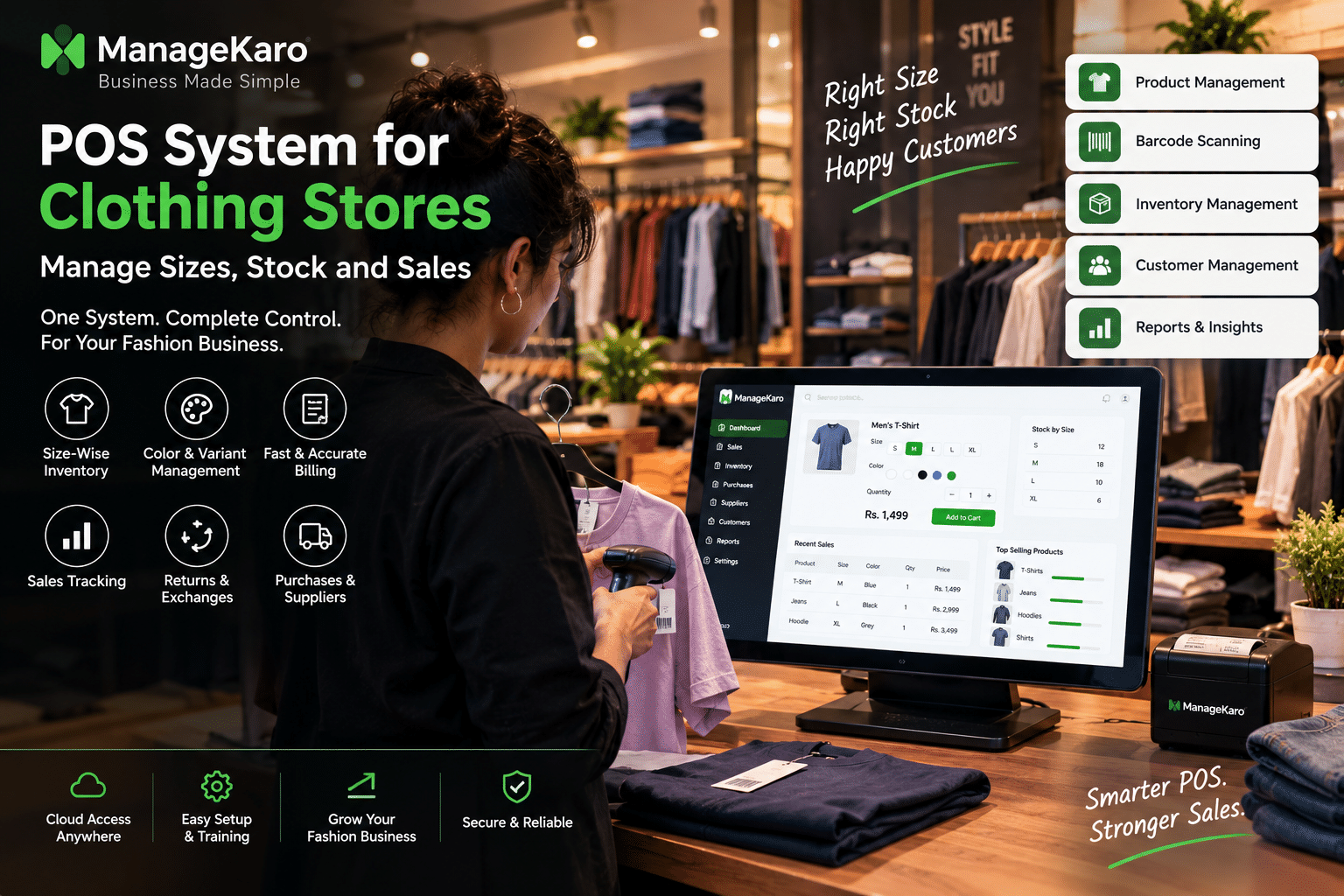
POS System for Clothing Stores: Manage Sizes, Stock, and Sales
Running a clothing store is different from managing many other types of retail businesses.
A single product can come in several sizes, colors, styles, and variations. A shirt may be available in Small, Medium, Large, and XL. The same shirt may also come in black, white, blue, and other colors.
Managing these variations manually can quickly become difficult.
A clothing store POS system helps organize products, sizes, colors, inventory, sales, purchases, customers, payments, and reports in one place. Instead of checking separate notebooks or spreadsheets, store owners can use POS software to get a clearer view of what is selling and which stock needs attention.
For clothing retailers, the right POS system should do more than create bills. It should make it easier to manage size-wise inventory, product variants, sales, returns, purchases, and customer information.
Quick Answer: What Is a POS System for Clothing Stores?
A POS system for clothing stores is software that helps fashion and apparel retailers manage billing, products, sizes, colors, stock, sales, customers, payments, purchases, suppliers, and reports.
Unlike a basic billing system, a clothing-focused POS workflow can organize different product variants so store owners can understand exactly which sizes and products are available or selling.
ManageKaro helps clothing businesses manage POS billing together with inventory, sales, purchases, suppliers, expenses, customer balances, ledgers, and reports in one connected business management system.
Why Clothing Stores Need a Specialized POS System
Clothing inventory can become complicated because products have multiple variations.
A store may sell:
- T-shirts in several sizes
- Jeans in different waist sizes
- Shoes in different sizes
- Dresses in multiple colors
- Jackets in different sizes and styles
- Shirts with several colors and fits
If all of these products are tracked manually, it can become difficult to know exactly what is available.
A clothing POS system can help owners organize these variations and connect them with sales and inventory records.
Common Problems in Clothing Stores
Without organized POS and inventory management, clothing stores may experience:
- Wrong stock counts
- Missing sizes
- Overstocked colors
- Slow billing
- Difficult product searches
- Confusing returns
- Unclear sales reports
- Manual stock checking
- Difficulty identifying popular sizes
- Problems tracking product variants
A connected POS system helps reduce these challenges.
How a POS System Works in a Clothing Store
A typical clothing-store POS workflow can look like this:
- Products are added to the system.
- Sizes and colors are recorded.
- Product prices are assigned.
- Opening inventory is entered.
- Customers select products.
- Staff searches or scans the product.
- The correct size and variant are selected.
- The bill is created.
- Payment is recorded.
- The sale is saved.
- Inventory movement can be reviewed.
- Reports provide information about sales and stock.
This creates a connection between the sales counter and the inventory records.
Key POS Features for Clothing Stores
1. Size-Wise Inventory Management
Size management is one of the most important features for clothing retailers.
A store should be able to identify how much stock is available for each size.
For example:
| Product | Small | Medium | Large | XL |
|---|---|---|---|---|
| Black T-Shirt | 8 | 15 | 12 | 5 |
| Blue Shirt | 4 | 10 | 7 | 3 |
| Denim Jacket | 2 | 6 | 8 | 4 |
This gives the owner a clearer understanding of which sizes need attention.
Why Size Tracking Matters
A clothing store may have plenty of a particular product but still lose sales because the customer’s required size is unavailable.
Size-wise inventory helps owners identify these situations earlier.
2. Color and Product Variant Management
Clothing products often have multiple colors and variations.
For example, one shirt could have:
- Black
- White
- Blue
- Green
The POS system should make it easy to distinguish these variants.
This helps staff select the correct product during billing and gives owners clearer inventory records.
3. Barcode Scanning
Barcode scanning can make clothing-store checkout faster.
Staff can scan the product barcode instead of manually searching for the item.
A barcode can help identify:
- Product
- Size
- Color
- Price
- Variant
This reduces the need for manual product entry.
4. Fast Clothing Store Billing
Customers may visit a clothing store with several products.
The billing process should allow staff to:
- Search products
- Scan products
- Select variants
- Change quantities
- Apply discounts
- Add customer information
- Select payment methods
- Generate receipts
A simple checkout workflow can reduce waiting time during busy periods.
5. Stock Tracking by Product
A clothing POS system should help owners understand overall product availability.
Owners can review:
- Current stock
- Low-stock items
- Out-of-stock products
- Product movement
- Recently sold products
- Stock value
This makes daily stock management easier.
Managing Clothing Sales With POS Software
Track Best-Selling Products
Sales reports can help store owners identify which products sell frequently.
For example, a clothing store may discover that certain:
- T-shirts
- Jeans
- Dresses
- Shirts
- Jackets
are selling more frequently than other products.
This information can support purchasing and merchandising decisions.
Track Popular Sizes
Size-level sales information can be especially useful.
A store may discover that certain sizes sell faster than others.
This can help owners plan future purchases based on their sales records rather than relying only on assumptions.
Track Popular Colors
Color preferences can also vary by product and customer base.
Sales data can help owners understand which colors are moving more quickly.
Monitor Slow-Moving Clothing
Not every product sells at the same speed.
Some items may remain in stock for long periods.
Identifying slow-moving products can help owners decide whether they need a promotion, pricing change, different display placement, or a different purchasing approach.
Managing Returns and Exchanges in a Clothing Store
Returns and exchanges are common in apparel retail.
Customers may need to exchange a product because of:
- Incorrect size
- Different color preference
- Product fit
- Damaged item
- Change of choice
A POS system should provide a clear way to record returns and exchanges.
Why Return Tracking Matters
When a product is returned, inventory records need to remain clear.
The business should know:
- Which product was returned
- Which size was returned
- Which variant was involved
- Whether money was refunded
- Whether another product was exchanged
Proper return records help keep sales and inventory information more reliable.
Managing Purchases and Suppliers
Clothing stores regularly purchase new collections and replenish existing products.
A POS system should connect purchases with inventory records.
Purchase Management
Owners should be able to record:
- Product purchased
- Size
- Color
- Quantity
- Purchase cost
- Supplier
- Purchase date
This makes it easier to understand where inventory came from and how much was spent.
Supplier Management
Supplier records can help owners track:
- Supplier details
- Purchase history
- Product supply
- Supplier balances
- Previous purchase costs
This gives clothing businesses better purchasing visibility.
Customer Management for Clothing Stores
Customer information can be valuable for fashion and apparel businesses.
A POS system can help maintain:
- Customer names
- Contact details
- Purchase history
- Payment records
- Outstanding balances
- Customer ledgers
This can be especially useful for stores that have repeat customers or offer credit sales.
Customer Purchase History
Purchase history can help store owners understand what customers have previously purchased.
For example, a repeat customer may regularly purchase a particular type of clothing or return for seasonal collections.
Organized customer records make these transactions easier to manage.
Payment Management for Clothing Stores
Clothing stores may accept several payment methods.
A POS system can help record:
- Cash
- Card
- Bank transfer
- Digital wallet
- Partial payment
- Credit sales
Clear payment records make end-of-day reconciliation easier.
Why Payment Tracking Matters
Without organized payment records, owners may struggle to understand whether recorded sales match collected payments.
A POS system can provide a clearer payment summary for daily operations.
Reports Clothing Store Owners Should Monitor
Reports turn daily transactions into useful business information.
Daily Sales Report
Shows the store’s sales activity for the day.
Product Sales Report
Shows which products are selling.
Size-Wise Sales Report
Helps identify which sizes are moving more frequently.
Inventory Report
Shows current stock and inventory movement.
Low-Stock Report
Helps identify products that may need replenishment.
Purchase Report
Shows purchasing activity and product acquisition.
Customer Balance Report
Helps owners track outstanding customer payments.
Expense Report
Helps track operating expenses alongside sales activity.
Benefits of Using a POS System in a Clothing Store
A properly configured POS system can help clothing retailers:
- Speed up checkout
- Organize product variants
- Track sizes
- Track colors
- Improve inventory visibility
- Reduce manual stock work
- Record payments
- Manage customers
- Track purchases
- Organize suppliers
- Monitor sales
- Review business reports
The biggest benefit is having these records connected instead of maintaining them separately.
POS System vs Manual Clothing Inventory
| Area | Manual System | Clothing POS System |
|---|---|---|
| Billing | Manual entry | Faster product-based billing |
| Size tracking | Difficult | Easier to organize |
| Color variants | Separate records | Organized product variants |
| Stock updates | Manual | Connected with sales |
| Sales reports | Manual calculations | Automated records |
| Returns | Paper records | Easier transaction tracking |
| Purchases | Separate records | Connected purchase management |
| Customer balances | Notebook/spreadsheet | Organized customer records |
| Supplier tracking | Scattered | Centralized records |
| Business reports | Time-consuming | Easier to review |
Manual records may work for a very small clothing shop, but growing stores often need a more organized system.
How ManageKaro Helps Clothing Stores
ManageKaro helps clothing businesses manage their daily operations through one connected business management system.
With ManageKaro, clothing stores can manage:
- POS billing
- Product records
- Inventory
- Sales
- Purchases
- Suppliers
- Expenses
- Customers
- Customer balances
- Ledgers
- Reports
This helps clothing-store owners reduce scattered records and gain better visibility over daily business activity.
Instead of using separate tools for billing, stock, purchases, customer balances, and reports, ManageKaro provides a connected workflow.
Clothing Store POS Setup Checklist
Before launching a POS system, clothing store owners should check:
- Add all clothing products
- Create product categories
- Add sizes
- Add colors and variants
- Add selling prices
- Add purchase costs
- Enter opening stock
- Add product barcodes
- Add customers
- Add suppliers
- Configure payment methods
- Set staff users
- Test billing
- Test returns and exchanges
- Check inventory reports
- Check sales reports
- Train staff
A structured setup makes it easier for staff to use the POS consistently.
Common Mistakes Clothing Stores Should Avoid
Using One Product Record for Every Size
Different sizes should be organized clearly so staff can identify available stock.
Ignoring Color Variations
Different colors can sell at different speeds, so keeping variants organized is useful.
Not Tracking Returns
Returns and exchanges can affect both sales and inventory records.
Relying Only on Physical Stock Checks
Physical counting is useful, but POS records provide ongoing visibility between stock counts.
Not Reviewing Slow-Moving Products
Slow-moving inventory can occupy shelf space and tie up business cash.
Giving Staff Uncontrolled Access
User roles can help owners manage permissions and improve accountability.
Who Can Benefit From a Clothing Store POS System?
A clothing POS system can be useful for:
- Clothing boutiques
- Fashion stores
- Garment shops
- Apparel retailers
- Shoe stores
- Sportswear stores
- Children’s clothing stores
- Women’s fashion stores
- Men’s clothing stores
- Department stores
- Multi-branch fashion retailers
Businesses with multiple sizes, colors, and product variants can especially benefit from organized POS and inventory management.
Final Thoughts
Clothing stores have unique inventory challenges because products can have multiple sizes, colors, styles, and variants.
A POS system helps bring these details into a structured workflow.
Instead of relying on manual billing and stock registers, clothing retailers can use POS software to manage sales, inventory, purchases, customers, suppliers, payments, returns, and reports.
For clothing businesses, the goal is not simply to create faster bills. It is to create a clearer connection between products, sizes, stock, sales, and business decisions.
ManageKaro helps clothing stores manage POS billing, inventory, sales, purchases, suppliers, expenses, customer balances, ledgers, and reports in one connected system, giving owners better visibility and control as their retail business grows.
Frequently Asked Questions
What is a POS system for clothing stores?
A POS system for clothing stores is software that helps manage billing, products, sizes, colors, inventory, sales, customers, payments, purchases, suppliers, and reports.
Can a POS system track clothing sizes?
Yes. A POS system can organize clothing products by size so businesses can monitor stock and sales for different sizes.
Can clothing POS software track colors and variants?
Yes. Clothing businesses can organize products into different colors, styles, and variants to make product selection and inventory management easier.
Why is inventory management important for clothing stores?
Inventory management helps clothing stores understand available stock, identify low-stock sizes and products, reduce overstocking, and make better purchasing decisions.
Can a POS system manage clothing returns and exchanges?
A POS system can help record returns and exchanges so sales and inventory records remain organized.
How can ManageKaro help clothing stores?
ManageKaro helps clothing businesses manage POS billing, inventory, sales, purchases, suppliers, expenses, customer balances, ledgers, and reports in one connected system.