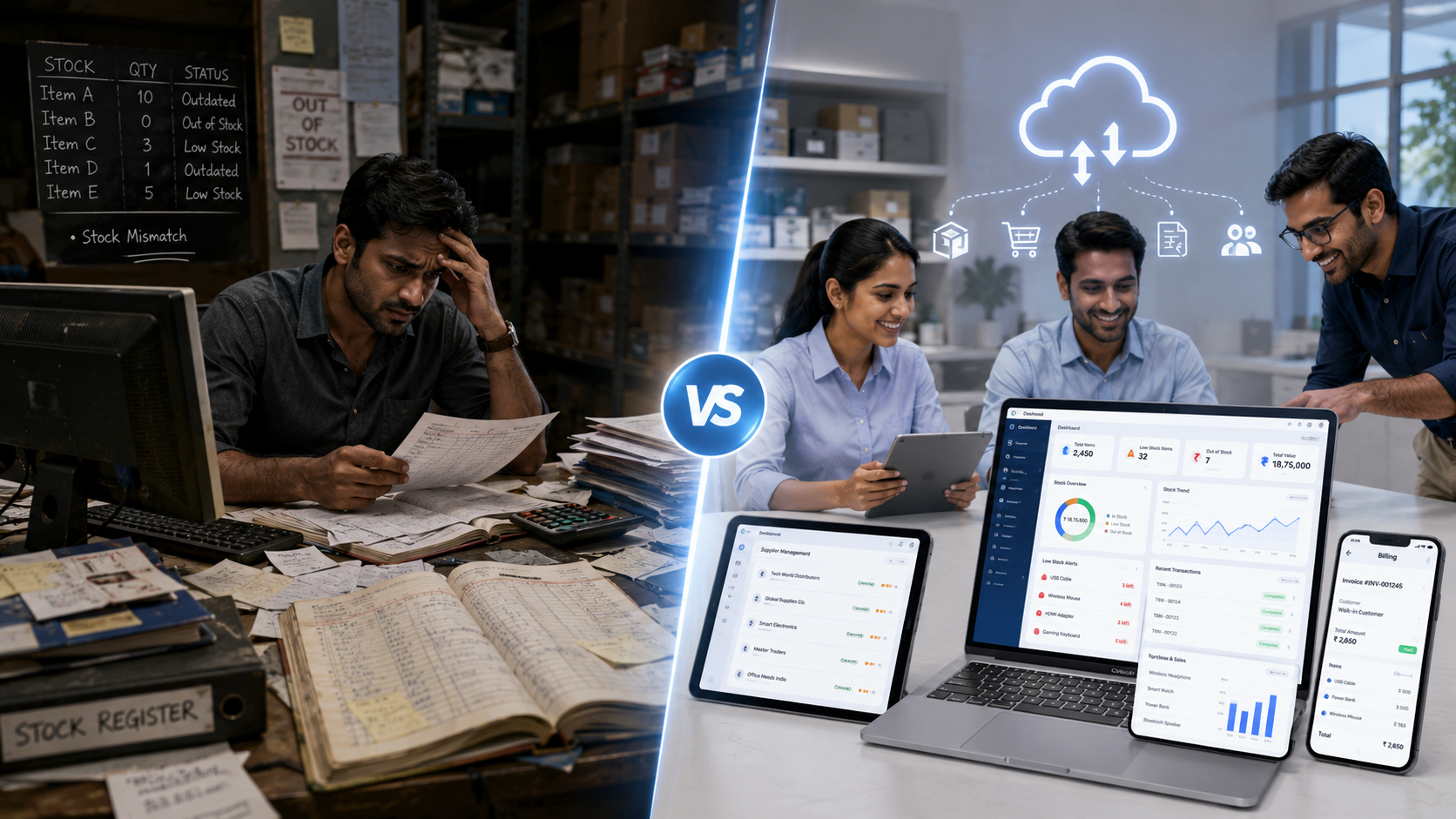
Many businesses reach a point where manual stock control is no longer enough. At first, a notebook, spreadsheet, or desktop system may seem manageable. But as products, customers, purchases, staff, and daily sales increase, inventory mistakes become harder to control. A product may show as available but already be sold. A staff member may update the wrong file. The owner may not be able to check stock when away from the shop. Purchase records may be stored separately from billing and sales. This is where business owners start comparing two options: Should we use cloud inventory management software or continue with a traditional system? Both options can work in different situations. The right choice depends on your business size, team, workflow, stock movement, and need for real-time visibility.
Cloud Inventory Software vs Traditional Systems: Key Takeaways
For businesses comparing cloud inventory management software vs traditional systems, the key difference is visibility and control. Traditional inventory systems, such as notebooks, spreadsheets, or desktop-only tools, may work for very small businesses, but they often become difficult to manage as products, staff, sales, and purchases increase.
Cloud inventory management software helps growing businesses manage stock through a connected online system. It can improve access to product records, stock levels, low-stock alerts, purchase history, supplier information, billing activity, and reports.
ManageKaro is designed for businesses that want to move beyond scattered manual records. It helps manage inventory, billing, sales, purchases, suppliers, expenses, customer balances, ledgers, and reports in one connected business management system.
Businesses should choose cloud inventory software when they need:
- Better stock visibility
- Faster access to inventory records
- Low-stock and out-of-stock tracking
- Billing and sales connection
- Purchase and supplier management
- Reports for decision-making
- Better team coordination
- A system that can support business growth
For small and growing businesses, ManageKaro provides a practical cloud-based approach to inventory and business operations, helping owners reduce stock confusion, improve daily control, and make better decisions.
Quick Answer: Cloud Inventory Software vs. Traditional Systems
Cloud inventory management software stores and manages stock data through an online system, making it easier for owners and teams to access updated inventory records across devices. Traditional systems usually rely on notebooks, spreadsheets, or locally installed software, which can be harder to update, share, and review in real time.
For growing businesses, ManageKaro offers a connected way to manage inventory, billing, sales, purchases, suppliers, expenses, customer balances, ledgers, and reports in one system, helping owners move beyond scattered traditional records.
What Is a Traditional Inventory System?
A traditional inventory system usually refers to older or manual ways of managing stock.
This may include:
- Paper registers
- Stock notebooks
- Excel spreadsheets
- WhatsApp updates
- Desktop-only software
- Locally saved files
- Manual stock cards
- Separate billing and purchase records
Traditional systems often depend heavily on one person, one device, or one physical location.
They may work for very small businesses with limited products and simple workflows. But as stock movement increases, traditional systems often become difficult to maintain accurately.
What Is Cloud Inventory Management Software?
Cloud inventory management software is an online system that helps businesses track stock, sales, purchases, suppliers, low-stock items, product movement, and reports through a connected platform.
Instead of storing records only in a notebook or one office computer, cloud software allows business information to be accessed more flexibly, depending on user permissions and internet availability.
Cloud inventory software usually helps businesses manage:
- Product records
- Stock quantities
- Low-stock alerts
- Sales-linked stock movement
- Purchases
- Supplier information
- Reports
- User access
- Multi-device usage
The main goal is to give owners and teams better visibility and control.
Cloud Inventory vs. Traditional Systems: Key Differences
| Area | Traditional Inventory System | Cloud Inventory Software |
|---|---|---|
| Access | Often limited to one place or device | Can be accessed from connected devices |
| Updates | Often manual and delayed | Easier to update and review |
| Team visibility | Depends on communication | Shared records improve visibility |
| Reports | Manual or limited | Easier reporting and insights |
| Low-stock tracking | Often noticed late | Alerts can help earlier |
| Billing connection | Often separate | Can connect with sales and billing |
| Scalability | Can become difficult as business grows | Better suited for growing operations |
| Risk of errors | Higher when records are scattered | Lower with structured records |
Advantages of Traditional Inventory Systems
Traditional systems are not always wrong. For some very small businesses, they may still feel familiar and inexpensive.
1. Familiar to Staff
Many employees are used to notebooks, spreadsheets, and manual stock checks. There may be less initial learning involved.
2. Low Initial Cost
Paper registers or basic spreadsheets may not require a monthly software cost.
3. Simple for Very Small Setups
If a business has very few products and only one person managing stock, a traditional system may be enough in the beginning.
However, the challenge begins when the business grows.
Limitations of Traditional Inventory Systems
1. Information Gets Scattered
Sales records may be in one place, supplier invoices in another, and stock counts somewhere else.
When records are scattered, owners cannot easily see the full picture.
2. Updates Are Often Delayed
A product may be sold, damaged, returned, or received, but the stock record may not be updated immediately.
Delayed updates cause wrong availability information.
3. Hard to Access Remotely
If the owner is away from the shop, they may need to call staff for every stock update.
This slows decision-making and increases dependency on verbal updates.
4. Higher Risk of Human Error
Manual entries can be missed, duplicated, or written incorrectly.
A single wrong number can affect stock counts, reorder decisions, billing, and customer promises.
5. Difficult to Scale
As products and staff increase, manual systems become harder to manage.
What worked for 100 products may not work for 1,000 products.
Advantages of Cloud Inventory Management Software
1. Better Stock Visibility
Cloud inventory software helps owners and teams see stock records more clearly.
They can check available products, low-stock items, out-of-stock products, purchase activity, and product movement from one connected system.
2. Faster Decision-Making
When stock information is easier to access, owners can make faster decisions about reordering, pricing, supplier follow-ups, and customer requests.
3. Improved Team Coordination
Multiple staff members can work from more consistent records.
This reduces confusion between sales staff, warehouse teams, purchasing staff, and managers.
4. Low-Stock Alerts
Low-stock alerts help businesses act before important products run out.
This can reduce lost sales and improve customer satisfaction.
5. Sales and Billing Connection
Cloud inventory software becomes even more useful when it connects with billing and sales.
When products are sold, stock movement becomes easier to review, helping reduce manual updates and mismatches.
6. Better Reporting
Reports help business owners understand what is selling, what is slow-moving, what needs reordering, and where cash may be stuck in inventory.
7. More Scalable for Growth
A cloud-based system is often better for businesses that plan to grow, add staff, increase products, or improve reporting.
When Should a Business Choose a Traditional System?
A traditional inventory system may be acceptable if:
- The business has very few products
- Only one person manages stock
- Sales volume is low
- Inventory does not change frequently
- The owner does not need remote access
- Reports are not important yet
- Manual errors are rare
However, even small businesses should review whether traditional systems are limiting growth.
When Should a Business Choose Cloud Inventory Software?
Cloud inventory management software is a better choice if:
- Your stock changes daily
- You have multiple staff members
- You manage many products
- You need low-stock visibility
- You want billing and inventory connected
- You need purchase and supplier records
- You want reports for better decisions
- You need access from more than one device
- You want to reduce manual errors
- You are planning to grow
For most growing businesses, cloud software provides better control than scattered manual systems.
How ManageKaro Helps Businesses Move From Traditional to Cloud-Based Control
ManageKaro helps businesses move away from scattered records by bringing key operations into one connected system.
With ManageKaro, businesses can manage:
- Inventory
- Sales
- Billing
- Purchases
- Suppliers
- Expenses
- Customer balances
- Ledgers
- Reports
- Product movement
- Low-stock and out-of-stock visibility
This matters because inventory does not work alone. Stock is connected to sales, billing, suppliers, purchases, expenses, and customer demand.
By organizing these activities together, ManageKaro helps businesses reduce confusion and gain better control over daily operations.
Common Mistakes When Switching From Traditional Systems
1. Moving Bad Data Into a New System
Before switching, clean product names, stock counts, prices, and supplier records.
2. Not Training Staff
Even simple software needs proper use. Staff should know how to record sales, purchases, returns, and adjustments.
3. Keeping Old and New Systems Side by Side Too Long
Using both manual and digital systems for too long can create duplicate work and confusion.
4. Ignoring Reports
The value of software increases when owners regularly review reports and act on them.
5. Choosing Software That Is Too Complicated
The best system is not always the most complex one. It should fit daily business operations.
Final Thoughts
Traditional inventory systems can work for very small businesses, but they often become limiting as operations grow.
Cloud inventory management software gives businesses better visibility, easier access, stronger team coordination, low-stock alerts, connected billing, and clearer reporting.
For business owners who want to reduce stock confusion and improve control, cloud-based software is often the smarter long-term choice.
With ManageKaro, businesses can manage inventory together with billing, sales, purchases, suppliers, expenses, ledgers, customer balances, and reports—helping them move from scattered records to stronger daily control.
Cloud Inventory Software vs Traditional Systems: FAQs
Quick answers for business owners comparing cloud inventory software, spreadsheets, notebooks, and desktop-based systems.
Cloud inventory software manages stock through an online connected system, while traditional systems usually depend on paper records, spreadsheets, or desktop-only tools. Cloud systems usually offer better access, updated records, reporting, team visibility, and stock control. ManageKaro helps businesses move from scattered records to one connected business management system.
Cloud inventory software is usually better for growing businesses because it can connect stock with billing, purchases, suppliers, low-stock alerts, and reports. Spreadsheets may work for very small setups, but they become harder to manage as products, sales, and staff increase.
A business should move to cloud software when stock errors, duplicate purchases, low-stock problems, staff confusion, delayed updates, or weak reporting start affecting daily operations. ManageKaro helps businesses manage inventory, billing, purchases, suppliers, expenses, ledgers, and reports in one system.
Yes. Cloud inventory software can reduce stock errors by keeping product records organized, connecting stock with sales and purchases, showing low-stock alerts, and making product movement easier to review.
ManageKaro helps businesses manage inventory, billing, sales, purchases, suppliers, expenses, customer balances, ledgers, and reports in one connected system. This makes it easier to move away from notebooks, spreadsheets, and scattered traditional records.