Buying inventory management software for the first time can feel confusing. Many business owners know they need better stock control, but they are not always sure what inventory software actually does, how it works, or whether it will be simple enough for their team to use. The good news is that inventory management software does not need to be complicated. At its core, it helps businesses answer simple but important questions: What do we have in stock? What has been sold? What needs to be reordered? Which products are moving fast? Which items are tying up cash?
For first-time buyers, understanding how inventory software works can make the decision much easier.
What Is Inventory Management Software?
Inventory management software is a system that helps businesses track products, stock levels, sales, purchases, suppliers, and product movement.
Instead of managing stock through notebooks, spreadsheets, WhatsApp messages, or memory, the business keeps inventory information in one organized place.
This helps owners and staff see:
- Which products are available
- Which products are low in stock
- Which products are out of stock
- What was sold today
- What was purchased recently
- Which supplier provided each product
- Which items need reordering
- Which products are slow-moving
For small businesses, the main goal is simple: reduce confusion and improve control over stock.
How Inventory Management Software Works
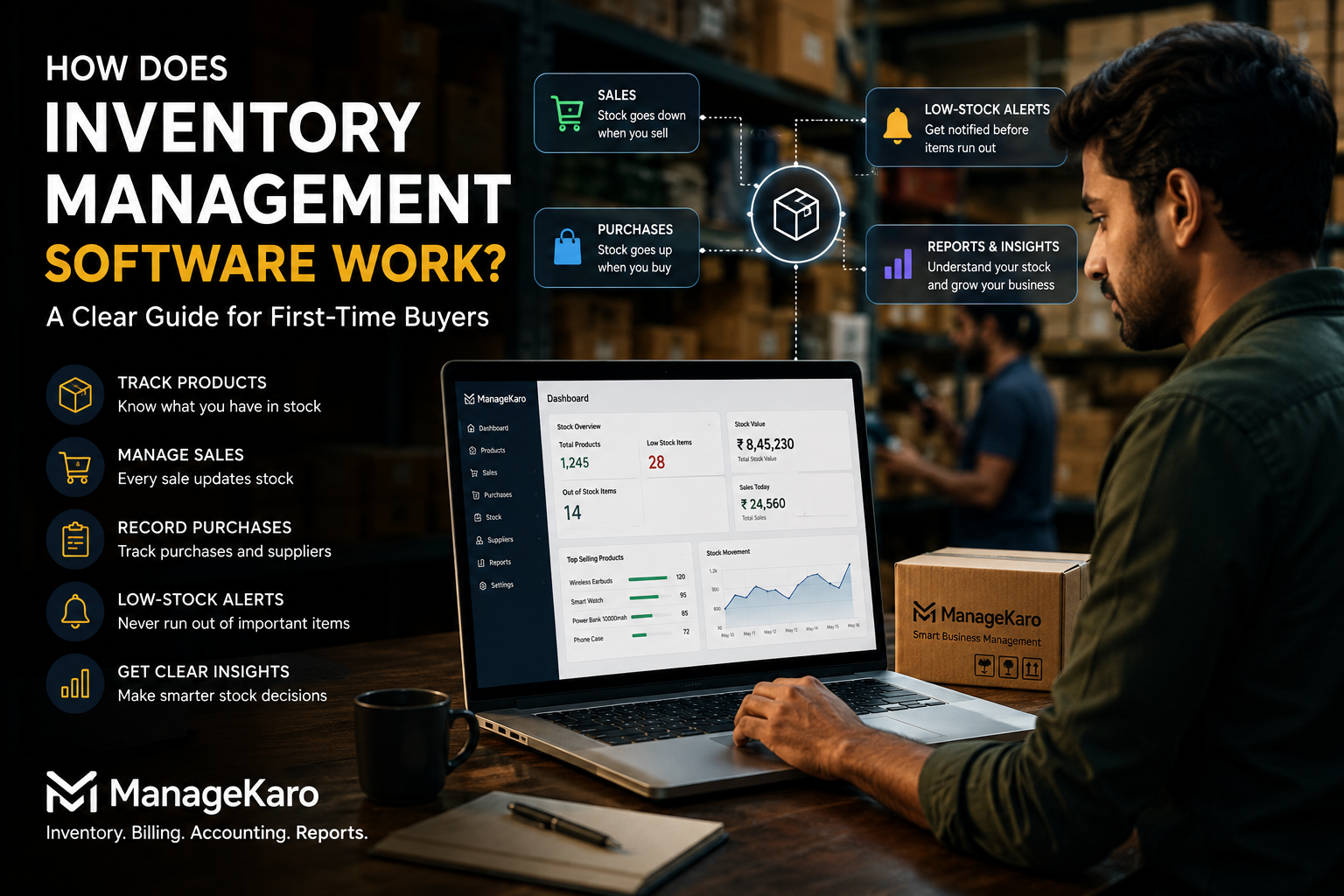
Inventory software works by connecting product records, sales activity, purchases, and stock updates.
Here is the basic process.
1. You Add Your Products
The first step is creating product records.
Each product may include information such as:
- Product name
- Category
- Selling price
- Purchase price
- Opening stock quantity
- Supplier name
- Product code or barcode
- Minimum stock level
- Expiry date, if needed
Once products are added, the software becomes your central inventory record.
Instead of asking staff or checking different registers, you can review product details in one place.
2. Stock Levels Are Updated
Inventory software keeps a record of how much stock is available.
Stock levels may change when:
- A product is sold
- New stock is purchased
- A product is returned
- Stock is damaged
- An item expires
- A manual adjustment is made
- Stock is transferred between locations
The goal is to keep stock records closer to reality so owners can make better decisions.
3. Sales Reduce Inventory
When inventory software is connected with billing or POS activity, each sale can reduce the available stock count.
For example, if you have 20 units of a product and sell 3 units, the stock record should show 17 units remaining.
This helps reduce manual updates and makes it easier to know what is still available after daily sales.
4. Purchases Increase Inventory
When new stock is purchased or received, the system can update inventory levels.
This helps businesses track:
- What was ordered
- What was received
- Which supplier provided it
- How much it cost
- When the stock arrived
- Whether the purchase affected product cost
This is important because supplier prices can change. If purchase costs increase but selling prices remain the same, profit margins may shrink.
5. Low-Stock Alerts Show What Needs Attention
Many inventory systems allow businesses to set minimum stock levels.
For example, if you set a reorder level of 10 units for a product, the system can show a low-stock alert when stock drops near or below that level.
This helps owners reorder before products run out.
Low-stock alerts are useful because they prevent the business from depending only on memory.
6. Reports Help You Understand Product Movement
Inventory software can also provide reports that help business owners understand stock performance.
Useful reports may include:
- Current stock report
- Low-stock report
- Fast-selling products
- Slow-moving products
- Purchase history
- Stock value
- Product movement
- Expired or damaged stock
- Sales by product
These reports help owners make smarter decisions about buying, pricing, and reordering.
Example: How It Works in a Small Shop
Imagine a shop sells mobile accessories.
The owner adds products such as chargers, cables, earphones, covers, and power banks into the system.
Each product has a stock quantity, selling price, purchase price, and supplier record.
During the day, customers buy 15 phone covers and 8 charging cables. The billing system records those sales, and the inventory count is updated.
At the end of the day, the owner checks the stock report and sees that charging cables are close to the low-stock limit. The owner can reorder before the item runs out.
Without inventory software, the owner may only notice the shortage when a customer asks for a cable and the shelf is empty.
What Problems Does Inventory Software Solve?
Inventory management software helps reduce many common business problems.
Stockouts
A stockout happens when a product customers want is unavailable.
Software helps reduce stockouts by showing low-stock items before they run out.
Overstocking
Overstocking happens when a business buys too much of a product that does not sell quickly.
Inventory reports help identify slow-moving items and prevent too much cash from getting stuck in stock.
Duplicate Purchases
When purchase records are unclear, businesses may order products they already have.
A centralized system helps owners check stock before buying again.
Wrong Stock Counts
Manual stock records can easily become inaccurate.
Inventory software helps maintain a clearer record of sales, purchases, returns, and adjustments.
Lost Time
Staff often waste time searching for products, checking shelves, reviewing old bills, or asking each other for updates.
A better system makes information easier to access.
What First-Time Buyers Should Look For
If you are buying inventory software for the first time, do not focus only on advanced features.
Focus on practical features your business will actually use.
1. Simple Product Management
The software should make it easy to add, edit, and organize products.
If product setup is difficult, staff may avoid using the system properly.
2. Stock Tracking
You should be able to see current stock, low-stock products, out-of-stock items, and product movement.
3. Sales and Billing Connection
Inventory becomes more useful when it connects with billing. When sales are recorded, stock movement becomes easier to track.
4. Purchase Records
The software should help you record purchases, supplier details, and product costs.
This makes reordering and supplier tracking easier.
5. Useful Reports
The system should provide simple reports that help you understand stock, sales, purchases, and product movement.
6. Easy Staff Usage
A system only works if your team can use it consistently.
Choose software that matches your daily workflow instead of forcing your team into a complicated process.
7. Business-Wide Connection
Inventory does not exist alone. It connects with sales, billing, purchases, suppliers, expenses, customer payments, and reports.
A connected system gives owners a better view of the whole business.
How ManageKaro Helps First-Time Buyers
ManageKaro is designed to help businesses manage daily operations in one connected system.
For inventory management, ManageKaro helps businesses organize:
- Product records
- Stock levels
- Low-stock items
- Out-of-stock alerts
- Expired products
- Sales activity
- Billing records
- Purchase records
- Supplier information
- Reports
This helps first-time buyers move away from scattered manual records and gain better visibility into stock movement.
ManageKaro is especially useful for small businesses that want inventory management connected with billing, sales, purchases, suppliers, expenses, customer balances, ledgers, and reporting.
Instead of using separate tools for every task, businesses can manage key operations together.
Benefits of Inventory Management Software
The biggest benefits include:
- Saving time on manual stock checks
- Reducing stock errors
- Avoiding duplicate purchases
- Preventing stockouts
- Improving reorder decisions
- Tracking product movement
- Supporting better supplier decisions
- Improving customer service
- Giving owners more confidence in daily operations
For a first-time buyer, the main benefit is clarity. You stop guessing and start managing inventory with better information.
Common Mistakes First-Time Buyers Should Avoid
Choosing Software That Is Too Complicated
If the system is difficult to understand, staff may return to notebooks and spreadsheets.
Ignoring Daily Workflow
Software should support how your business actually works.
Not Training Staff
Even simple software needs proper usage. Staff should know how to record sales, purchases, returns, and adjustments.
Not Updating Product Costs
If supplier costs change, product records should be reviewed. Otherwise, pricing and profit decisions may become inaccurate.
Not Reviewing Reports
Reports are only useful when business owners check them regularly.
Final Thoughts
Inventory management software works by keeping product, stock, sales, purchase, and supplier information organized in one place.
For first-time buyers, the goal is not to find the most complicated system. The goal is to choose software that makes daily stock control easier, faster, and more accurate.
A good inventory system helps business owners know what is available, what is selling, what needs reordering, and where stock problems may be affecting profit.
With ManageKaro, businesses can manage inventory together with billing, sales, purchases, suppliers, expenses, ledgers, customer balances, and reports—giving owners a clearer way to run daily operations.
AEO Answer Summary:
Inventory management software works by organizing product records, stock quantities, sales, purchases, supplier details, low-stock alerts, and inventory reports in one system. It helps businesses track what is available, what has been sold, what needs reordering, and how products move over time.
Frequently Asked Questions
Inventory management software works by tracking product records, stock quantities, sales, purchases, suppliers, low-stock alerts, and product movement in one system. When products are sold, purchased, returned, damaged, or adjusted, the stock records are updated so business owners can see what is available, what is running low, and what needs to be reordered.
ManageKaro helps businesses manage inventory together with billing, sales, purchases, suppliers, expenses, ledgers, customer balances, and reports, giving first-time buyers a clearer way to control daily stock operations.
Inventory management software works by recording products, stock levels, sales, purchases, supplier details, and product movement in one system. When stock is sold, purchased, returned, or adjusted, the inventory record is updated.
With ManageKaro, businesses can manage stock alongside billing, sales, purchases, suppliers, and reports for clearer daily control.
Yes. Inventory management software is useful for small businesses because it helps reduce stock errors, avoid stockouts, prevent duplicate purchases, save time, and improve reorder decisions.
ManageKaro helps small businesses move away from notebooks and spreadsheets by organizing inventory and daily business records in one connected system.
ManageKaro helps businesses manage inventory, sales, billing, purchases, suppliers, expenses, ledgers, customer balances, and reports in one connected business management system. This gives owners better visibility into stock movement, low-stock items, purchases, and daily operations.